Listing the object in the destination bucket
-
Double-click the tS3List
component to open its Basic
settings view on the Component tab.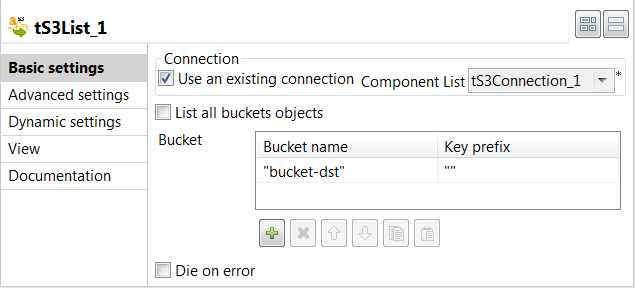
-
Select the Use an existing
connection check box to reuse the Amazon
S3 connection information you have defined in the tS3Connection
component. -
Clear the List all buckets
objects check box, and then click the
[+] button to add
one row in the Bucket table
displayed and set the value for each column. In this
example, bucket-dst for
the Bucket name column and
empty value for the Key
prefix column, this way only the objects
in the bucket-dst bucket
will be listed. -
Double-click the tIterateToFlow component to open its
Basic settings view
on the Component
tab.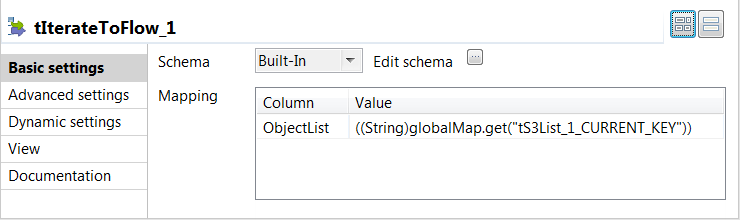
-
Click the […] button next
to Edit schema and in the
pop-up schema dialog box define the schema by adding one
column ObjectList of
String type.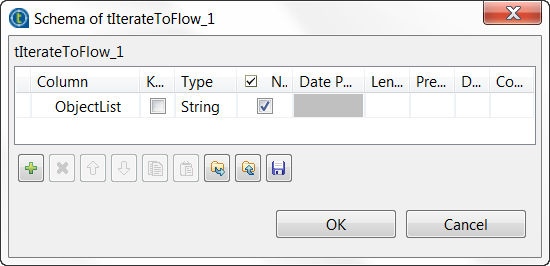
-
Click OK to save the changes
and in the pop-up dialog box click Yes to accept the propagation. -
Double-click the tLogRow
component to open its Basic
settings view on the Component tab.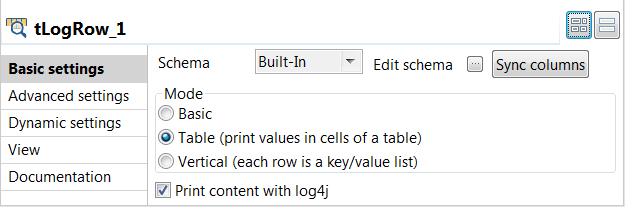
-
In the Mode area, select
Table (print values in cells
of a table) for better readability of the
result.
Document get from Talend https://help.talend.com
Thank you for watching.
Subscribe
Login
0 Comments