Loading data into a database table
-
Double-click tFixedFlowInput to open its
Basic settings view.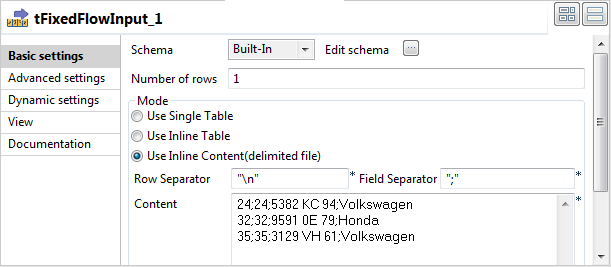
-
Click the […] button next to Edit schema and in the pop-up window define the
schema by adding four columns: dn,
id_owners, registration, and make,
all of String type.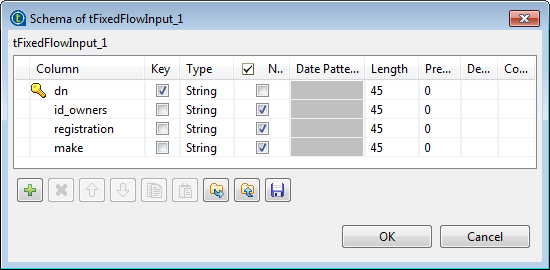
-
Click OK to close the schema editor and
accept the propagation prompted by the pop-up dialog box. -
In the Mode area, select Use Inline Content(delimited file), and then in
the Content field displayed, enter the
following input
data:24;24;5382 KC 94;Volkswagen
32;32;9591 0E 79;Honda
35;35;3129 VH 61;Volkswagen
-
Double-click tMysqlOutput to open its
Basic settings view.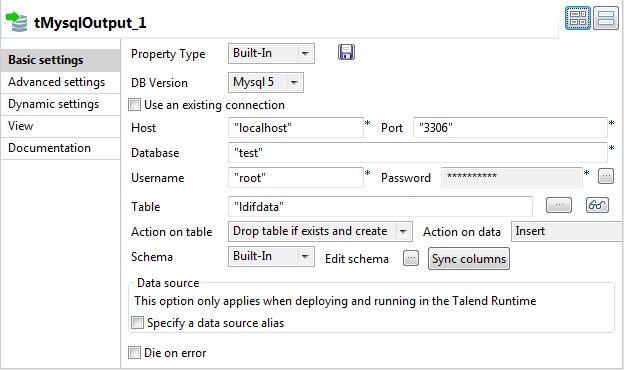
-
Fill in the Host, Port, Database, Username, and Password fields with your MySQL database connection
details. -
In the Table field, enter the name of the
table into which the data will be written. In this example, it is ldifdata. -
Select Drop table if exists and create
from the Action on table drop-down
list.
Document get from Talend https://help.talend.com
Thank you for watching.
Subscribe
Login
0 Comments