Loading the test set into the Job
-
Double-click tFileInputDelimited to open its
Component view.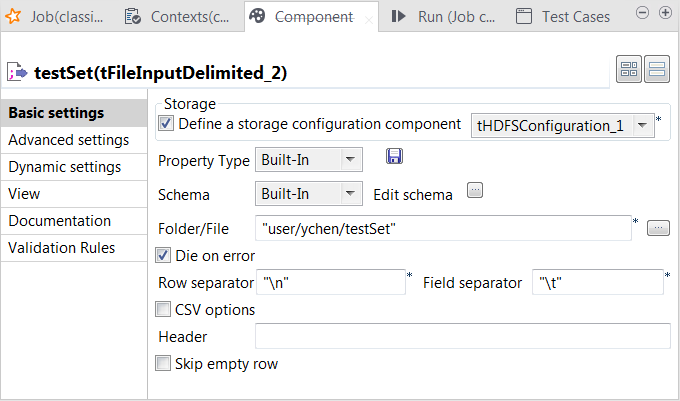
-
Select the Define a storage configuration component check box
and select the tHDFSConfiguration component
to be used.tFileInputDelimited uses this
configuration to access the training set to be used. -
Click the […] button next to Edit
schema to open the schema editor. -
Click the [+] button five times to add five rows and in the
Column column, rename them to reallabel, sms_contents, num_currency,
num_numeric and num_exclamation, respectively.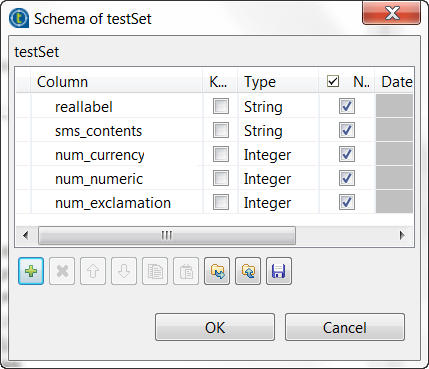 The reallabel and the sms_contents columns carries the raw data which is
composed of the SMS text messages in the sms_contents column and the labels indicating whether a message
is spam in the reallabel column.The other columns are used to carry the features added to the raw datasets
as explained previously in this scenario. They contains the number of
currency symbols, the number of numeric values and the number of exclamation
marks found in each SMS message. -
In the Type column, select Integer for the num_currency, num_numeric and
num_exclamation columns. - Click OK to validate these changes.
-
In the Folder/File field, enter the
directory where the test set to be used is stored. -
In the Field separator field, enter
, which is the separator used by the
datasets you can download for use in this scenario.
Document get from Talend https://help.talend.com
Thank you for watching.
Subscribe
Login
0 Comments