Populating the database table with input data
-
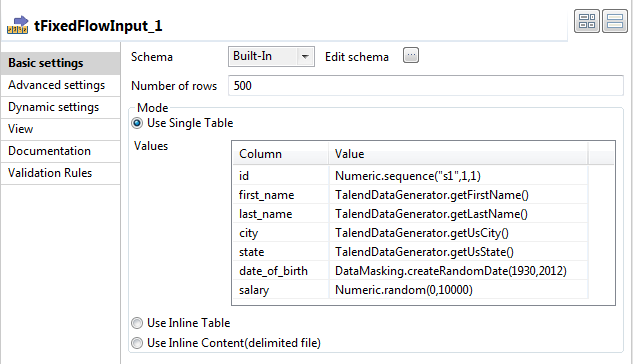
In the design workspace, select tFixedFlowInput and click the Component tab to define its basic settings
-
In the Basic settings view, in the Number of rows field, enter
500. -
In this scenario, the source database table has seven columns: id, first_name, last_name, city, state, date_of_birth,
and salary
Click the […] button next to Edit schema to define the following data
structure.
-
Click the floppy disk icon to save the schema as a generic schema for later
reuse. - In the Select folder window, select default and click OK.
- Choose a name for your generic schema and click Finish.
- Click OK.
-
The first column of the Values table
automatically reflects the data structure you entered previously. -
In the Values table, enter a value for each
column. -
In the design workspace, select tMysqlOutput
and click the Component tab to define its basic
settings.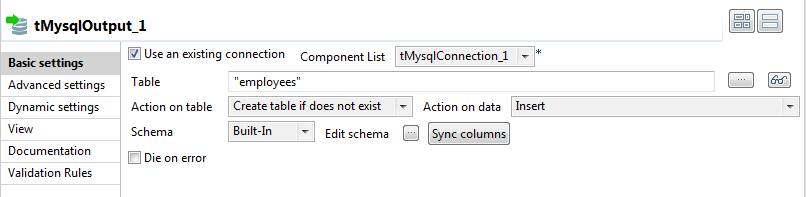 The output schema will automatically be the same as the previous component, in
this case tFixedFlowInput.
Document get from Talend https://help.talend.com
Thank you for watching.
Subscribe
Login
0 Comments