Reading data from MongoDB
-
Double-click tMongoDBInput to open its
Component view.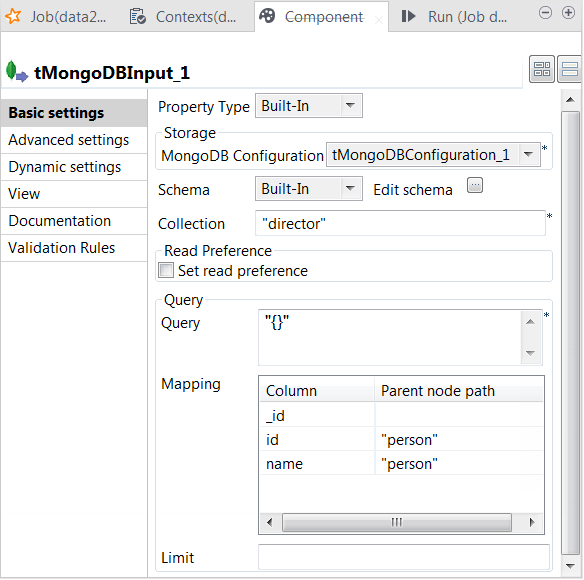
- Click the […] button next to Edit schema to open the schema editor.
-
Click the [+] button to add the schema
columns for output as shown in this image.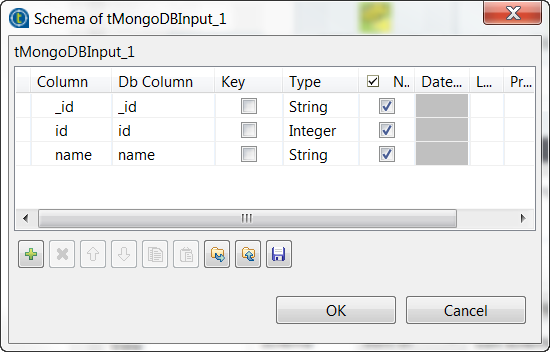 If you want to extract the technical ID of each document, add a column called
_id to the schema. In this example, this
column is added. These technical IDs were generated at random by MongoDB when
the sample data was written to the database. -
In the Collection field, enter the name of
the collection from which you need to read data. In this example, it is the
director one used previously in tMongoDBOutput. -
In the Mapping table, the three output
columns have been automatically added. You need to add the parent nodes they
belong to in the MongoDB documents. In this example, enter, within double
quotation marks, person in the Parent node path column for the id and the name columns and leave
the _id column as is, meaning that the
_id field is at the root of each
document.The tMongDBInput component parses the
extracted documents according to this mapping and writes the data in the
corresponding columns.
Document get from Talend https://help.talend.com
Thank you for watching.
Subscribe
Login
0 Comments