Reading the sample candidate data
- Ensure that the MapR client has been properly installed and configured in the machine in which the current Job runs.
- Drop tFixedFlowInput and tMapROjaiOutput onto the workspace.
- Connect tFixedFlowInput to tMapROjaiOutput using a Row > Main link and accept the propagation of the schema from tMapROjaiOutput.
-
Double-click tFixedFlowInput to open its Component view.

-
Click the […] button to open the schema editor.
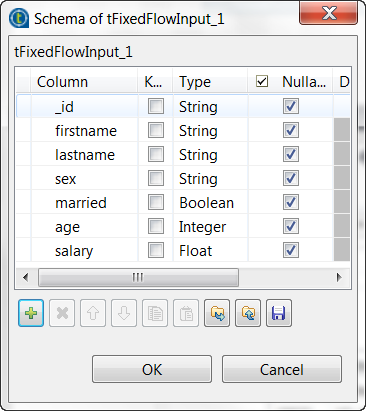
- The _id column exists already because this
column was retrieved from tMapROjaiOutput in
the previous steps to provide the technical IDs of the documents to
be stored in a MapR Ojai database. This column is required by
tMapROjaiOutput. - Click the [+] button to add the other columns
and rename them to firstname,
lastname, sex,
married, age and
salary, respectively. The type of the
married column should be
Boolean, the type of the
age column Integer and
the salary column
Float.
- The _id column exists already because this
-
Click OK to close the schema editor and accept the
propagation of the schema. -
In the Mode area, select the Use Inline
table radio button to display the table in which you add the sample
data. -
Click the [+] button to add four rows and enter the
sample data as is displayed in the image above.This sample data is used for demonstration purposes only.
The data of the String type should be put in double
quotation marks and the data of the three other types should be put without any
quotation marks.
Parent topic: Writing candidate data in a MapR-DB OJAI database
Document get from Talend https://help.talend.com
Thank you for watching.
Subscribe
Login
0 Comments