Reading the sample data into the Job
-
Double-click either of the two tHDFSInput
components to display its Basic settings
view.Since these two tHDFSInput components are used to read
the same source data and are configured the same way. You need to configure
both of them using the procedure explained in this section.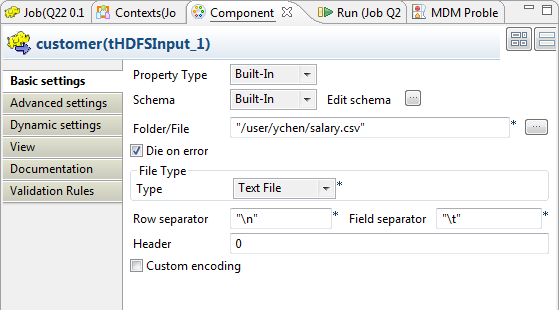
- Click the […] button next to Edit schema to open the schema editor.
-
Click the [+] button three times to add
three rows and in the Column column, rename
them to id, name and salary,
respectively.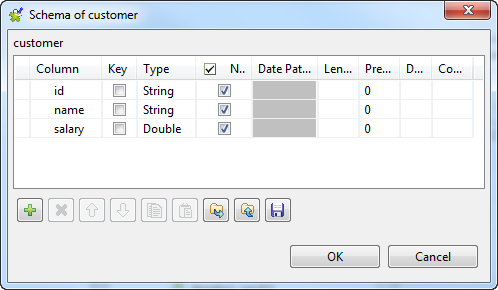
- In the Type column of the salary row, select Double.
-
Click OK to validate these changes and
accept the propagation prompted by the pop-up dialog box. -
In the Folder/File field, browse to the
sample data to be processed in the HDFS system. - In the File type area, select Text file from the Type list.
-
In the Field separator field, enter
.
Document get from Talend https://help.talend.com
Thank you for watching.
Subscribe
Login
0 Comments