Renaming the file on the FTP server
Configure the tFTPRename
component to rename the file on the FTP server.
component to rename the file on the FTP server.
-
Double-click the tFTPRename component
to open its Basic settings view.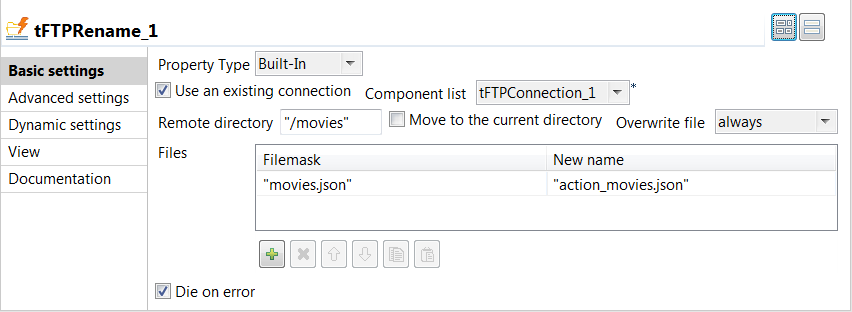
-
Specify the connection details required to access the FTP server. In
this example, select the Use an existing connection
check box and from the Component list drop-down
list displayed, select the connection component to reuse its connection details you
have already defined. -
In the Remote directory field, enter
the directory on the FTP server where the file to be renamed exists. In this
example, it is /movies. -
Clear the Move to the current
directory check box. -
In the Files table, click the
[+] button to add a line, and then enter the
existing file name in the Filemask column field and
the new file name in the New name column field. In
this example, they are movies.json and action_movies.json respectively.
Document get from Talend https://help.talend.com
Thank you for watching.
Subscribe
Login
0 Comments