Retrieving data from the source and target table
-
Double-click the first tOracleInput to
open its Basic settings view.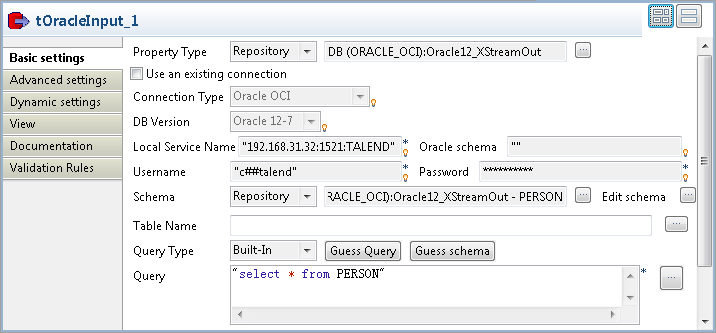
-
Set Property Type to Repository and select the connection metadata corresponding
to the Oracle database on which the XStream outbound server is configured,
Oracle12_XStreamOut in this example.
The connection type, database version and other connection details
information will be completed automatically.Set Schema to Repository and select the source table from the Repository. In this example, it is PERSON. -
In the Query field, enter the following SQL statement to
retrieve all the data from the source table:1select * from PERSON -
Double-click the second tOracleInput to
open its Basic settings view.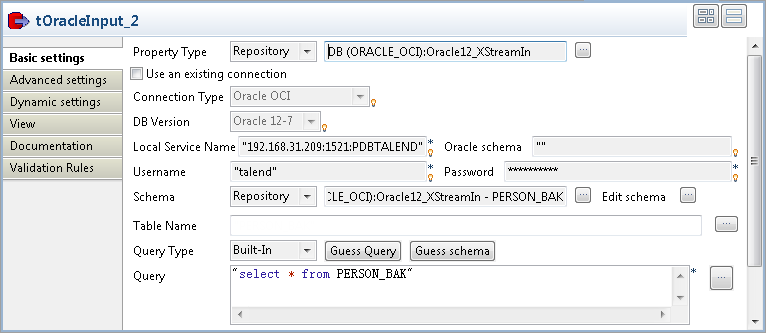
-
Set Property Type to Repository and select the connection metadata corresponding
to the Oracle database on which the XStream inbound server is configured,
Oracle12_XStreamIn in this example.
The connection type, database version and other connection details
information will be completed automatically.Set Schema to Repository and select the target table from the Repository. In this example, it is PERSON_BAK. -
In the Query field, enter the following SQL statement to
retrieve all the data from the target table:1select * from PERSON_BAK -
Double-click the first tLogRow to open
its Basic settings view.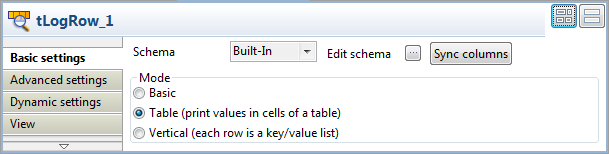 In the Mode area, select Table (print values in cells of a table) for a
better display of the result. - Do the same to configure the second tLogRow.
Document get from Talend https://help.talend.com
Thank you for watching.
Subscribe
Login
0 Comments