Retrieving files unloaded to Amazon S3
-
Double-click tS3List to open its
Basic settings view on the Component tab.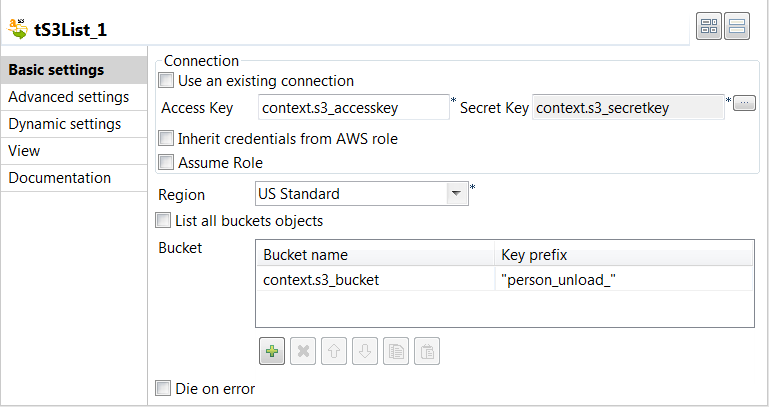
-
Fill the Access Key and Secret
Key fields with their corresponding context variables. -
From the Region list, select the AWS
region where the unload files are created. In this example, it is US Standard. -
Clear the List all buckets objects check
box, and click the [+] button under the
table displayed to add one row.Fill in the Bucket name column with the name of the
bucket in which the unload files are created. In this example, it is the
context variable context.s3_bucket.Fill in the Key prefix column with the name prefix for
the unload files. In this example, it is person_unload_. -
Double-click tS3Get to open its Basic settings view on the Component tab.
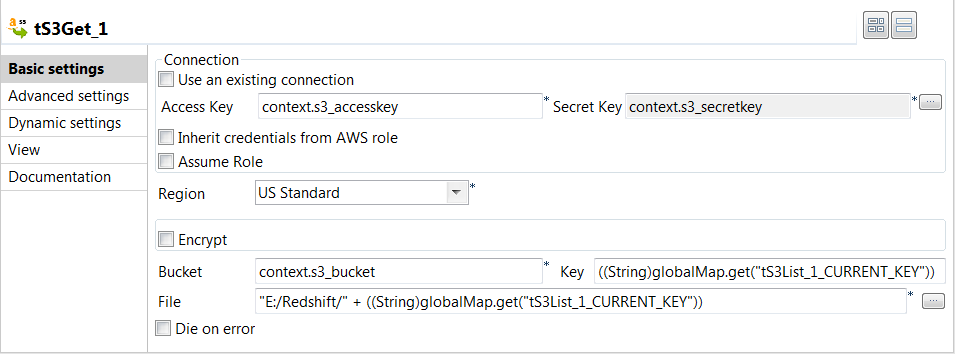
-
Fill the Access Key field and Secret Key field with their corresponding context
variables. -
From the Region list, select the AWS
region where the unload files are created. In this example, it is US Standard. -
In the Bucket field, enter the name of
the bucket in which the unload files are created. In this example, it is the
context variable context.s3_bucket.In the Key field, enter the name of the
unload files by pressing Ctrl + Space and
from the list selecting the global variable ((String)globalMap.get(“tS3List_1_CURRENT_KEY”)). -
In the File field, enter the local path
where the unload files are saved. In this example, it is “E:/Redshift/” +
((String)globalMap.get(“tS3List_1_CURRENT_KEY”)).
Document get from Talend https://help.talend.com
Thank you for watching.
Subscribe
Login
0 Comments