Retrieving the transformed data from NetSuite
-
Double-click the second tNetsuiteInput to
open its Basic settings view.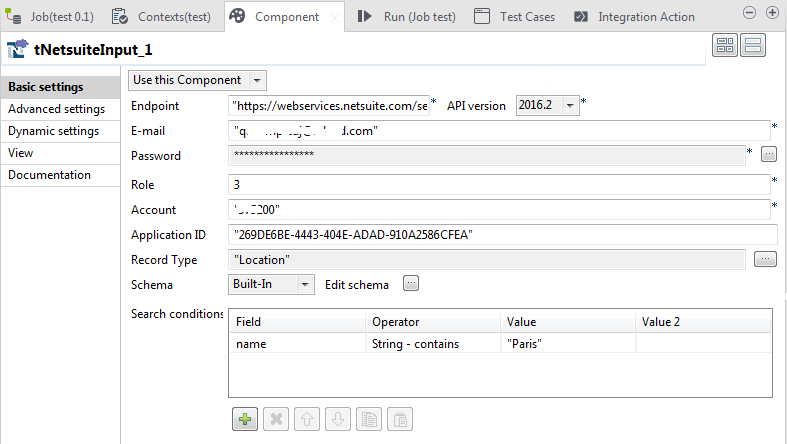
-
In the Endpoint,
API version, E-mail, Password,
Role, Account, and Application ID fields,
enter the information required to access NetSuite. -
Click the […] button next to the
Record Type field, and from the
dialog box that opens select Location to
read the location type information from NetSuite.The schema corresponding to the location record type is automatically
retrieved. -
Define a search condition.
-
Click the [+] button below the
Search condition table to add
one row. -
Click the cell of the Field
column and select name from the
drop-down list. -
Click the cell of the Operator
column and select String –
Contains from the drop-down list. -
In the cell of the Value column,
enter Paris to retrieve only the record whose
name contains Paris.
-
Click the [+] button below the
-
Double-click tLogRow to open its Basic settings view.
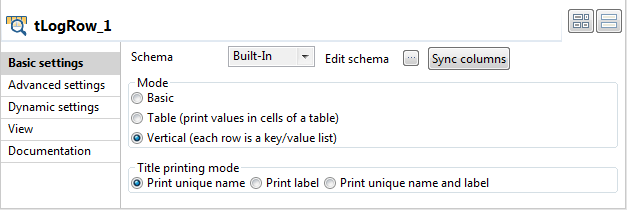
-
In the Mode area, select Vertical (each row is a key/value list) for better
readability of the result. -
Connect the second tNetsuiteInput to
tLogRow using a Row > Main connection. -
Connect the first tNetsuiteInput to the
second tNetsuiteInput using a Trigger > OnSubjobOk connection.
Document get from Talend https://help.talend.com
Thank you for watching.
Subscribe
Login
0 Comments