Saving and executing the Job
The tMelissaDataAddress reads the input address rows,
corrects and formats the addresses and gives the result in a kind of
“standardized” address output rows.
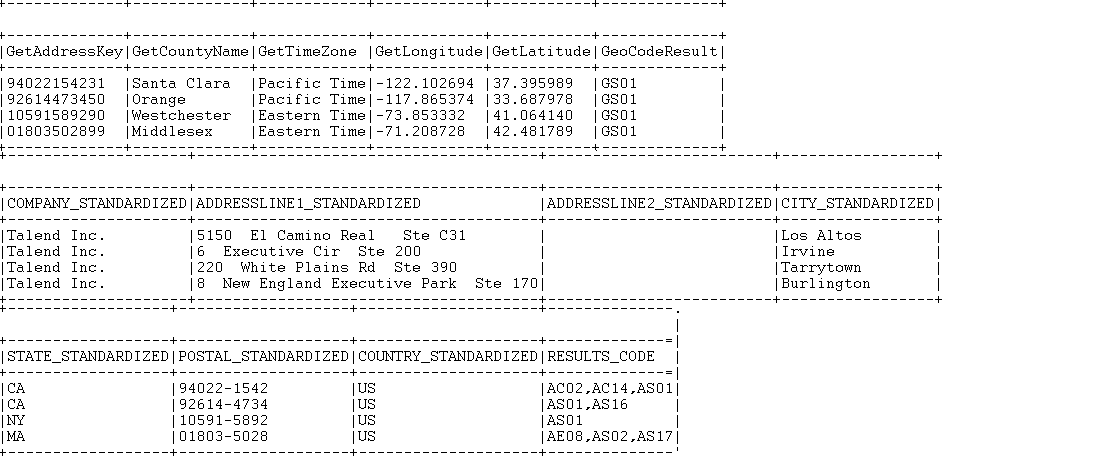
tMelissaDataAddress will also match street names against a
ZIP code, match geographic data to ZIP code and city information and finally parse
street addresses and return all these results via different output columns. This
example shows only some of the output columns written by the
tMelissaDataAddress component:
- GetAddressKey returns the Address Key.
- GetCountyName returns the county names.
- GetTimeZone returns the time zone.
- GetLongitude returns the longitude data.
- GetLatitude returns the latitude data.
- GeoCodeResult returns the GeoCode result codes.
- The output standard columns return the standard company name, up to two
street address lines, the standard city name, two-letter abbreviation for
the state name, the postal ZIP code, and two-letter abbreviation for the
country name. -
The RESULTS_CODE output column returns verification codes for each of the
processed address rows. These codes are written in comma-delimited
lists. Each code consists of two letters followed by two numbers. These
codes indicate different statuses and errors. For example, the
AC02code means that the state name is corrected
based on the combination of city name and ZIP code, and the
AS01code means that the street address is valid
and deliverable.
For a complete list of the result codes and for further information about all the
output columns,visit http://www.melissadata.com/.