Setting up the child Job
-
Create a new Job ChildJob and add a
tFileInputDelimited component and a
tLogRow component to it. -
Connect the tFileInputDelimited component to
the tLogRow component using a Row > Main link. -
Double-click the tFileInputDelimited component to open its Basic settings view.
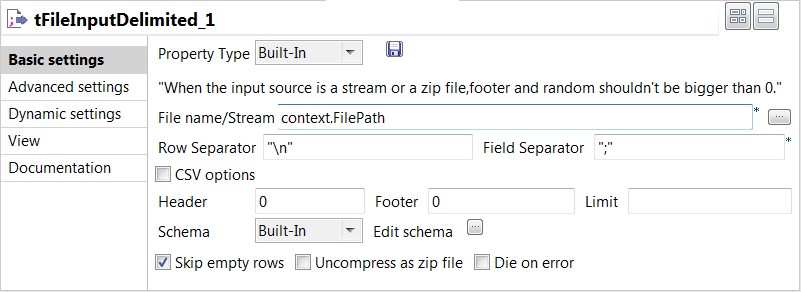
-
Click in the File Name field
and then press F5 to open the New Context Parameter dialog box and configure the
context variable.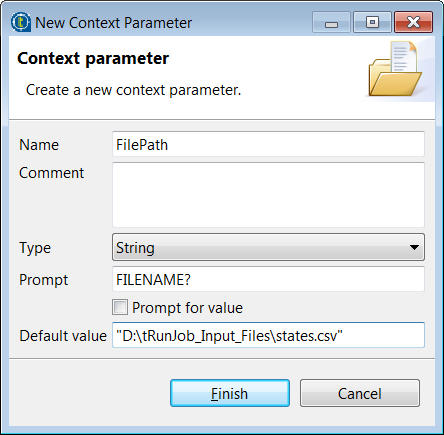
-
In the Name field, enter a
name for this new context variable, FilePath in this
example. -
In the Default value field,
enter the full path to the default input file. -
Click Finish to validate the
context parameter setup and fill the File Name
field with the context variable.You can also create or edit a context parameter in the Context tab view beneath the design workspace. For more
information, see
Talend Studio User Guide. -
Click the […] button next
to Edit schema to open the Schema dialog box where you can configure the schema
manually. -
In the dialog box, click the [+] button to add columns and name them according to the input file
structure.In this example, this component will actually read files defined in the parent
Job, and these files contain up to five columns. Therefore, add five string type
columns and name them Column1,
Column2, Column3,
Column4, and Column5
respectively, and then click OK to validate
the schema configuration and close the Schema
dialog box. -
Double-click the tLogRow
component and on its Basic settings view,
select the Table option to view displayed content in table
cells.
Document get from Talend https://help.talend.com
Thank you for watching.
Subscribe
Login
0 Comments