Setting up the schema
-
Double-click tMySQLInvalidRows to display its
Basic settings view and define its
properties.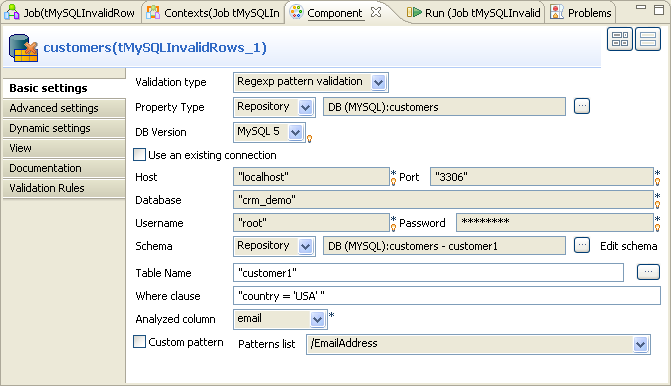 All database connection fields are automatically filled in. If you do not
define your input files in the Repository, fill in the details manually after
selecting Built-in in the Property Type field -
From the Validation type list, select
Regex pattern validation.This will validate data in the selected rows against a regex pattern. For an
example scenario about validating data against DQ rule, see Scenario: Checking customer table against a given DQ rule to select customer records. -
In the Table Name field, type in the name of
the database table on which you want to run the Job,
customer1 in this example. -
In the Where clause field, type in the WHERE
clause that will restrict the number of the analyzed rows.In this example you want to examine only the emails of the customers from the
USA. -
In the Analyzed column list, select the
column you want to analyze, Email in this example. -
In the Patterns list, select the
Talend Studio
database pattern against which you want to
check addresses from the Email column, Email
Address in this example.If you select the Custom pattern check box,
you can customize the regular expression against which the data is to be
checked. -
Double click tLogRow to open its Basic settings view and define its properties as
needed.
Document get from Talend https://help.talend.com
Thank you for watching.
Subscribe
Login
0 Comments