tLibraryLoad
Depending on the Talend solution you
are using, this component can be used in one, some or all of the following Job
frameworks:
-
Standard: see tLibraryLoad Standard properties.
The component in this framework is generally available.
-
MapReduce: see tLibraryLoad MapReduce properties.
The component in this framework is available only if you have subscribed to one
of the
Talend
solutions with Big Data. -
Spark Batch: see tLibraryLoad properties for Apache Spark Batch.
The component in this framework is available only if you have subscribed to one
of the
Talend
solutions with Big Data. -
Spark Streaming: see tLibraryLoad properties for Apache Spark Streaming.
The component in this framework is available only if you have subscribed to Talend Real-time Big Data Platform or Talend Data
Fabric.
tLibraryLoad Standard properties
These properties are used to configure tLibraryLoad running in the Standard Job framework.
The Standard
tLibraryLoad component belongs to the Custom Code family.
The component in this framework is generally available.
Basic settings
|
Library |
Select the library you want to import from the list, or click on the […] button to browse to the library in your directory. |
Advanced settings
|
Dynamic Libs |
Lib Paths: Enter the access path to your library, between |
|
Import |
Enter the Java code required to import, if required, the external library used in |
Global Variables
|
Global Variables |
ERROR_MESSAGE: the error message generated by the A Flow variable functions during the execution of a component while an After variable To fill up a field or expression with a variable, press Ctrl + For further information about variables, see |
Usage
|
Usage rule |
This component may be used alone, although it is more logical to |
|
Limitation |
The library is loaded locally. |
Scenario: Checking the format of an e-mail address
This scenario uses two components, a tLibraryLoad and
a tJava. The goal of this scenario is to check the
format of an e-mail address and verify whether the format is valid or not.

Setting up the Job
-
In the Palette, open the Custom_Code folder, and slide a tLibraryLoad and tJava
component onto the workspace. -
Connect tLibraryLoad to tJava using a Trigger > OnSubjobOk
link.
Configuring the tLibraryLoad component
-
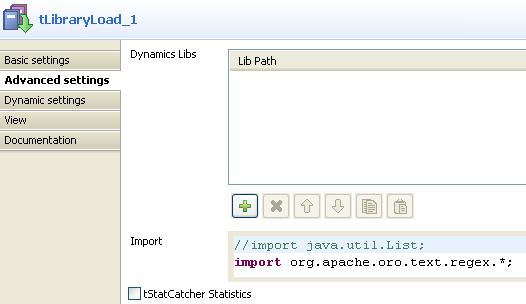
Double-click on tLibraryLoad to display
its Basic settings. From the Library list, select
jakarta-oro-2.0.8.jar. -
In the Import field of the Advanced settings tab, type import
org.apache.oro.text.regex.*;
Configuring the tJava component
-
Double-click on tJava to display its
Component view. -
In the Basic settings tab, enter your
code, as in the screenshot below. The code allows you to check whether the
character string pertains to an e-mail address, based on the regular
expression:"^[\w_.-]+@[\w_.-]+\.[\w]+$".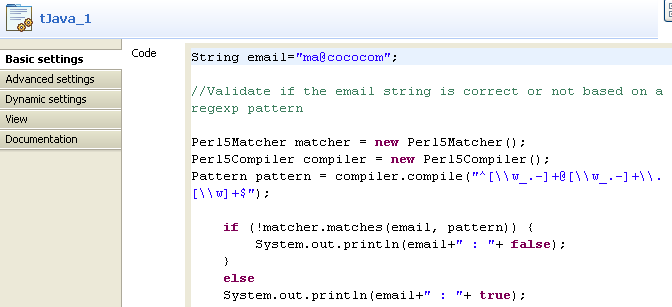
Job execution
Press F6 to save and run the Job.
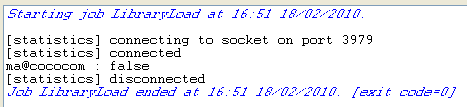
The Console displays the boolean
false. Hence, the e-mail address is not valid as the format
is incorrect.
tLibraryLoad MapReduce properties
These properties are used to configure tLibraryLoad running in the MapReduce Job framework.
The MapReduce
tLibraryLoad component belongs to the Custom Code family.
The component in this framework is available only if you have subscribed to one
of the
Talend
solutions with Big Data.
Basic settings
|
Library |
Select the library you want to import from the list, or click on the […] button to browse to the library in your directory. |
Advanced settings
|
Dynamic Libs |
Lib Paths: Enter the access path to your library, between |
|
Import |
Enter the Java code required to import, if required, the external library used in |
Global Variables
|
Global Variables |
ERROR_MESSAGE: the error message generated by the A Flow variable functions during the execution of a component while an After variable To fill up a field or expression with a variable, press Ctrl + For further information about variables, see |
Usage
|
Usage rule |
In a You need to use the Hadoop Configuration tab in the This connection is effective on a per-Job basis. For further information about a Note that in this documentation, unless otherwise |
|
Limitation |
The library is loaded locally. |
Related scenarios
No scenario is available for the Map/Reduce version of this component yet.
tLibraryLoad properties for Apache Spark Batch
These properties are used to configure tLibraryLoad running in the Spark Batch Job framework.
The Spark Batch
tLibraryLoad component belongs to the Custom Code family.
The component in this framework is available only if you have subscribed to one
of the
Talend
solutions with Big Data.
Basic settings
|
Library |
Select the library you want to import from the list, or click on the […] button to browse to the library in your directory. |
Advanced settings
|
Import |
Enter the Java code required to import, if required, the external library used in |
Usage
|
Usage rule |
This component is used with no need to be connected to other components. This component, along with the Spark Batch component Palette it belongs to, appears only Note that in this documentation, unless otherwise |
|
Spark Connection |
You need to use the Spark Configuration tab in
the Run view to define the connection to a given Spark cluster for the whole Job. In addition, since the Job expects its dependent jar files for execution, you must specify the directory in the file system to which these jar files are transferred so that Spark can access these files:
This connection is effective on a per-Job basis. |
|
Limitation |
The library is loaded locally. |
Related scenarios
No scenario is available for the Spark Batch version of this component
yet.
tLibraryLoad properties for Apache Spark Streaming
These properties are used to configure tLibraryLoad running in the Spark Streaming Job framework.
The Spark Streaming
tLibraryLoad component belongs to the Custom Code family.
The component in this framework is available only if you have subscribed to Talend Real-time Big Data Platform or Talend Data
Fabric.
Basic settings
|
Library |
Select the library you want to import from the list, or click on the […] button to browse to the library in your directory. |
Advanced settings
|
Import |
Enter the Java code required to import, if required, the external library used in |
Usage
|
Usage rule |
This component is used with no need to be connected to other components. This component, along with the Spark Streaming component Palette it belongs to, appears Note that in this documentation, unless otherwise explicitly stated, a scenario presents |
|
Spark Connection |
You need to use the Spark Configuration tab in
the Run view to define the connection to a given Spark cluster for the whole Job. In addition, since the Job expects its dependent jar files for execution, you must specify the directory in the file system to which these jar files are transferred so that Spark can access these files:
This connection is effective on a per-Job basis. |
|
Limitation |
The library is loaded locally. |
Related scenarios
No scenario is available for the Spark Streaming version of this component
yet.