tMatchIndexPredict
Compares a new data set with a lookup data set stored in ElasticSearch, using
tMatchIndex. tMatchIndexPredict outputs unique
records and suspect duplicates in separate files.
In the potential duplicates output, each record contains the fields from the source
records and the fields from the potentially matching lookup records.
For more information about tMatchIndex, see
the tMatchIndex documentation on Talend Help Center (https://help.talend.com).
This component can run only with Spark 2.0+ and ElasticSearch 5+.
tMatchIndexPredict properties for Apache Spark Batch
These properties are used to configure tMatchIndexPredict
running in the Spark Batch Job framework.
The Spark Batch
tMatchIndexPredict component belongs to the Data Quality family.
The component in this framework is available when you have subscribed to any Talend Platform product with Big Data or Talend Data
Fabric.
Basic settings
|
Define a storage configuration component |
Select the configuration component to be used to provide the configuration If you leave this check box clear, the target file system is the local The configuration component to be used must be present in the same Job. For |
|
Schema and Edit Schema |
A schema is a row description. It defines the number of fields (columns) to Click Sync columns to retrieve the schema from Click Edit schema to make changes to the schema.
You need to manually edit the output schema to add the necessary columns The output schema of this component contains a read-only column:
LABEL: used only with the |
|
|
Built-In: You create and store the |
|
|
Repository: You have already created |
|
ElasticSearch configuration |
Nodes: Enter the location
Index: Enter the name of the ElasticSearch index |
|
Models |
Pairing model folder: Set the path to the folder
Matching model
Matching model folder: Set the
No-match label: Enter the label used for the If you want to store the model in a specific file system, for example S3 The button for browsing does not work with the Spark Local mode; if you are using the Spark Yarn or the Spark Standalone mode, |
Usage
|
Usage rule |
This component is used as an intermediate step. This component, along with the Spark Batch component Palette it belongs to, appears only |
|
Spark Batch Connection |
You need to use the Spark Configuration tab in
the Run view to define the connection to a given Spark cluster for the whole Job. In addition, since the Job expects its dependent jar files for execution, you must specify the directory in the file system to which these jar files are transferred so that Spark can access these files:
This connection is effective on a per-Job basis. |
Scenario: Doing continuous matching using tMatchIndexPredict
This scenario applies only to a subscription-based Talend Platform solution with Big data or Talend Data Fabric.
After indexing lookup data in Elasticsearch using tMatchIndex, you do
not need to restart the matching process from scratch. The
tMatchIndexPredict component compares new data records with the
lookup stored in ElasticSearch.
In this example, a list of early childhood education centers in Chicago coming from ten
different source has been cleaned, deduplicated and indexed in Elasticsearch. You want
to match new records which contain information about early childhood education centers
in Chicago against the reference data set stored in Elasticsearch.
tMatchIndexPredict uses pairing and matching models to group together
records from the input data and the matching records from the reference data set indexed
in Elasticsearch and label the suspect pairs.
tMatchIndexPredict outputs potential duplicates and unique records in
separate files.
-
You generated a pairing model.
You can find an example of how to generate a pairing
model on Talend Help Center (https://help.talend.com). -
You generated a matching model.
You can find an example of how to generate a
matching model on Talend Help Center (https://help.talend.com). -
Clean and deduplicated data has been indexed in Elasticsearch to match
against new data records and determine whether they are unique records or
suspect duplicates.You can find an example of how to index clean and
deduplicated data in ElasticSearch on Talend Help Center (https://help.talend.com). -
The Elasticsearch search cluster must be running ElasticSearch 5+.
Setting up the Job
-
Drop the following components from the Palette onto the
design workspace: tFileInputDelimited,
tMatchIndexPredict and two
tFileOutputDelimited components. -
Connect tFileInputDelimited to the
tMatchIndexPredict using a Row > Main connection. -
Connect tMatchIndexPredict to the first
tFileOutputDelimited using a Row > Suspect duplicates connection. -
Connect tMatchIndexPredict to the second
tFileOutputDelimited using a Row > Unique rows connection.
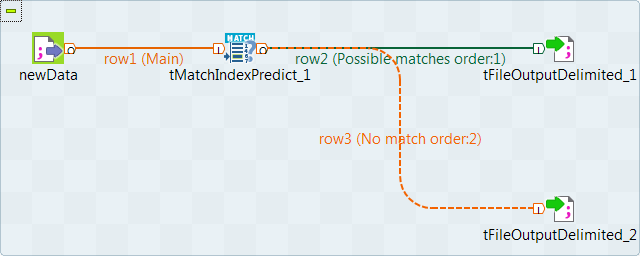
Configuring the input component
-
Double-click the tFileInputDelimited component to open
its Basic settings view.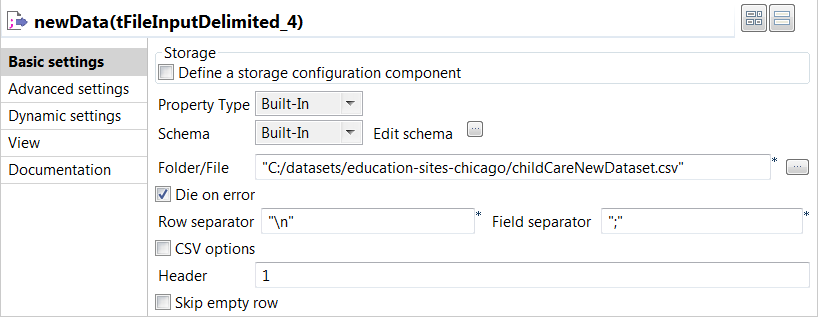
-
Click the […] button next to Edit
schema and use the [+] button in the
dialog box to add String type columns: Original_Id,
Source, Site_name and
Address. -
Click OK in the dialog box and accept to propagate the
changes when prompted. -
In the Folder/File field, set the path to the input
file. -
Set the row and field separators in the corresponding fields and the header and
footer, if any.
Configuring the tMatchIndexPredict component
-
Double-click the tMatchIndexPredict component to open
its Basic settings view.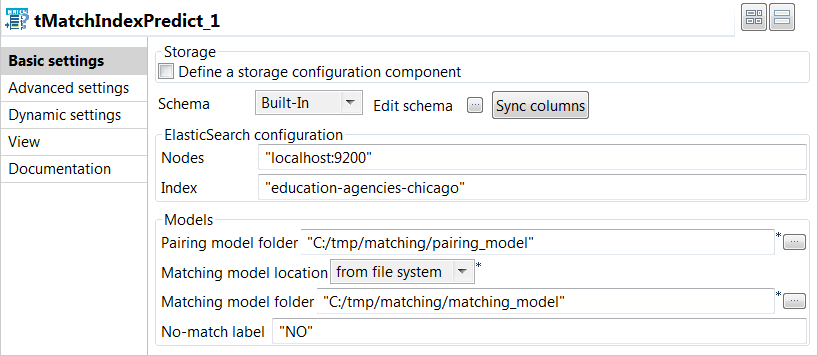
-
In the ElasticSearch configuration area, enter the
location of the cluster hosting the Elasticsearch system to be used in the
Nodes field, for example:"localhost:9200"
-
In the ElasticSearch configuration area, enter the name
of the Elasticsearch index where the reference data is stored in the
Index field, for example:"education-agencies-chicago"
-
In the Models area, set the information about the
pairing and matching models:-
Set the path to the folder containing the model files generated by the
tMatchPairing component in the Pairing
model folder field. -
Select from the Matching model location list
where to get the model file generated by the
tMatchModel component.In this example, select from file system
because the classification Job using the
tMatchModel component is not integrated to
the current Job. -
Set the path to the folder containing the model file generated by the
tMatchModel component in the
Matching model folder field. -
Set the label used for the unique records output in the
No-match label field.
-
Set the path to the folder containing the model files generated by the
Computing suspect pairs and unique rows
-
Double-click the first tFileOutputDelimited
component to display the Basic settings view and
define the component properties.You have already accepted to propagate the schema to the output
components when you defined the input component. -
Clear the Define a storage configuration component
check box to use the local system as your target file system. -
Click the […] button next to Edit
schema and use the [+] button in the
dialog box to add the columns from the reference data set to the schema.You must add _ref at the end of the column names
to be added to the suspect duplicates output. In this example:
Original_id_ref,
Source_ref,
Site_name_ref and
Address_ref.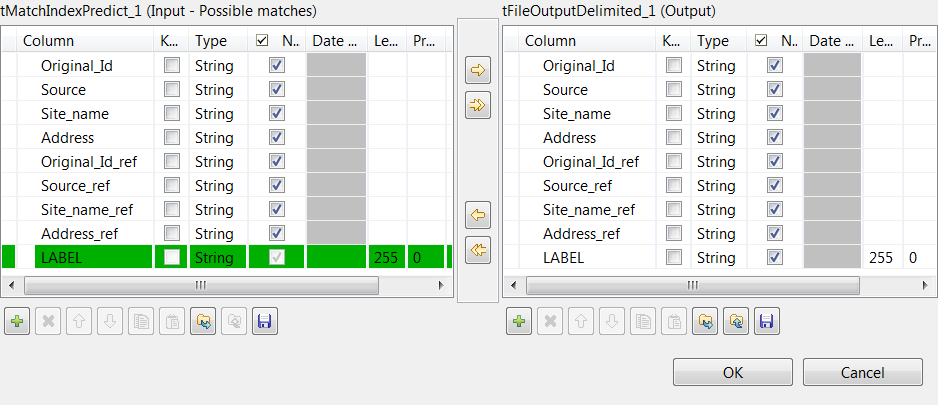
-
In the Folder field, set the path to the folder
which will hold the output data. -
From the Action list, select the operation for
writing data:-
Select Create when you run the Job for the
first time. -
Select Overwrite to replace the file every
time you run the Job.
-
- Set the row and field separators in the corresponding fields.
-
Select the Merge results to single file check box,
and in the Merge file path field set the path where
to output the file of the suspect record pairs. -
Double-click the second tFileOutputDelimited
component and define the component properties in the Basic
settings view, as you do with the first component.This component creates the file which holds the unique rows generated
from the input data. -
Press F6 to save and execute the
Job.
the matching records from the reference data set indexed in Elasticsearch and labels
the suspect pairs.

another file.

You can now clean and deduplicate the unique rows and use
tMatchIndex to add them to the reference data set stored in
Elasticsearch.