tMysqlLastInsertId
Obtains the primary key value of the record that was last inserted in a Mysql table
by a user.
tMysqlLastInsertId fetches the last inserted ID from a
selected MySQL Connection.
tMysqlLastInsertId Standard properties
These properties are used to configure tMysqlLastInsertId running in the Standard Job framework.
The Standard
tMysqlLastInsertId component belongs to the Databases family.
The component in this framework is generally available.
Basic settings
|
Schema and Edit |
A schema is a row description. It defines the number of fields (columns) to |
|
|
Built-In: You create and store the |
|
|
Repository: You have already created |
|
Click Edit schema to make changes to the schema.
|
|
|
Component list |
Select the relevant tMysqlConnection component in the list if more than |
Advanced settings
|
tStatCatcher Statistics |
Select this check box to collect log data at the component |
Global Variables
|
Global Variables |
NB_LINE: the number of rows processed. This is an After
ERROR_MESSAGE: the error message generated by the A Flow variable functions during the execution of a component while an After variable To fill up a field or expression with a variable, press Ctrl + For further information about variables, see |
Usage
|
Usage rule |
This component is to be used as an intermediary component. Warning:
If you use this component with |
|
Dynamic settings |
Click the [+] button to add a Once a dynamic parameter is defined, the Component List box in the Basic For examples on using dynamic parameters, see Scenario: Reading data from databases through context-based dynamic connections and Scenario: Reading data from different MySQL databases using dynamically loaded connection parameters. For more information on Dynamic |
Scenario: Get the ID for the last inserted record with
tMysqlLastInsertId
The following Java scenario creates a job that opens a connection to Mysql database,
writes the defined data into the database, and finally fetches the last inserted ID on
the existing connection.
-
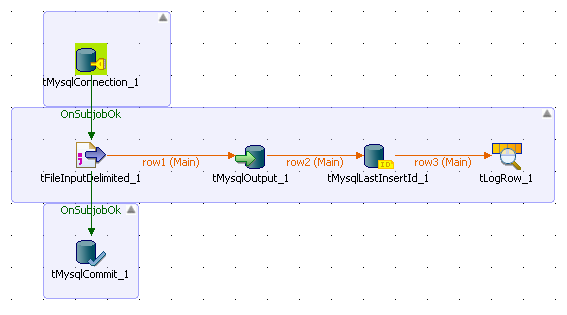
Drop the following components from the Palette onto the design workspace: tMySqlConnection, tMySqlCommit,
tFileInputDelimited, tMySqlOutput, tMysqlLastInsertId, and tLogRow. -
Connect tMySqlConnection to tFileInputDelimited using an OnSubjobOk link.
-
Connect tFileInputDelimited to tMySqlCommit using an OnSubjobOk link.
-
Connect tFileInputdelimited to the three
other components using Row Main links.
-
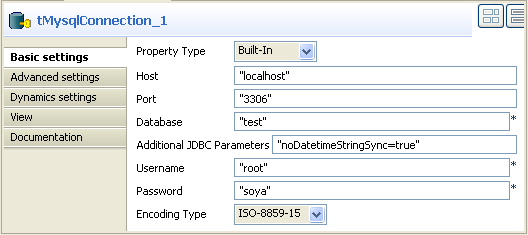
In the design workspace, select tMysqlConnection.
-
Click the Component tab to define the basic
settings for tMysqlConnection. -
In the Basic settings view, set the
connection details manually or select them from
the context variable list, through a Ctrl+Space click in the corresponding field if you stored
them locally as Metadata DB connection entries. For more information about
Metadata, see
Talend Studio
User Guide
.
-
In the design workspace, select tMysqlCommit
and click the Component tab to define its basic
settings. -
On the Component List, select the relevant
tMysqlConnection if more than one
connection is used. -
In the design workspace, select tFileInputDelimited.
-
Click the Component tab to define the basic
settings of tFileInputDelimited.

-
Fill in a path to the processed file in the File
Name field. The file used in this example is
Customers. -
Define the Row separator that allow to
identify the end of a row. Then define the Field
separator used to delimit fields in a row. -
Set the header, the footer and the number of processed rows as necessary. In
this scenario, we have one header. -
Click
the three-dot button next to Edit Schema to
define the data to pass on to the next component.
Related topics:
Talend Studio
User Guide.
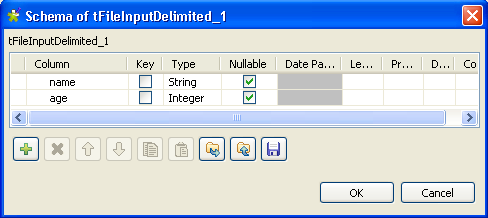
In this scenario, the schema consists of two columns, name and
age. The first holds three employees’ names and the second
holds the corresponding age for each.
-
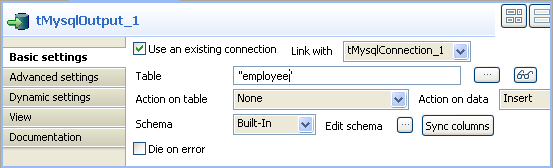
In the design workspace, select tMySqlOutput.
-
Click the Component tab to define the basic
settings of tMySqlOuptput.
-
Select the Use an existing connection check
box. -
In the Table field, enter the name of the
table where to write the employees’ list, in this example:
employee. -
Select relevant actions on the Action on table
and Action on data lists. In this
example, no action is carried out on table, and the action carried out on data
is Insert. -
Click
Sync columns to synchronize columns with
the previous component. In this example, the schema to be inserted into the
MySql database table consists of the two columns name
and age.

-
In the design workspace, select tMySqlLastInsertId.
-
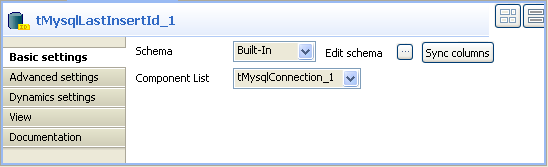
Click the Component tab to define the basic
settings of tMySqlLastInserId.
-
On the Component List, select the relevant
tMysqlConnection, if more than one
connection is used. -
Click
Sync columns to synchronize columns with
the previous component. In the output schema of tMySqlLastInsertId, you can see the read-only column
last_insert_id that will fetch the last inserted ID on the
existing connection.

You can select the data type Long from the
Type drop-down list in case of a huge number of
entries.
-
In the design workspace, select tLogRow and
click the Component tab to define its basic
settings. For more information, see tLogRow. -
Save your job and press F6 to execute
it.

tMysqlLastInsertId fetched the last inserted ID for
each line on the existing connection.