Unloading data from Redshift to file(s) on S3
-
Double-click tRedshiftUnload to open its
Basic settings view on the Component tab.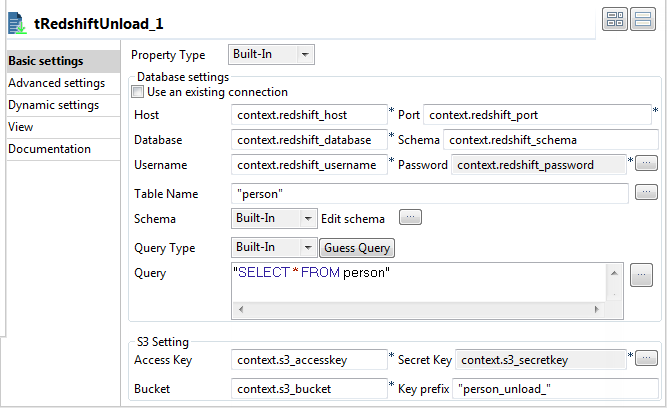
-
Fill the Host, Port, Database, Schema, Username, and Password fields
with their corresponding context variables.Fill the Access Key, Secret Key, and Bucket fields also with their corresponding context
variables. -
In the Table Name field, enter the name
of the table from which the data will be read. In this example, it is
person. -
Click the […] button next to Edit schema and in the pop-up window define the
schema by adding two columns: ID of
Integer type and Name of String
type. -
In the Query field, enter the following
SQL statement based on which the result will be unloaded.1"SELECT * FROM person" -
In the Key prefix field, enter the name
prefix for the unload files. In this example, it is person_unload_.
Document get from Talend https://help.talend.com
Thank you for watching.
Subscribe
Login
0 Comments