Uploading an object to an Amazon S3 bucket
-
Double-click the tS3Put
component to open its Basic
settings view on the Component tab.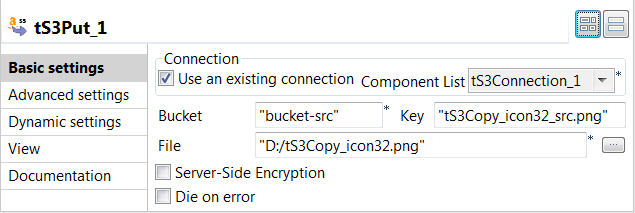
-
Select the Use an existing
connection check box to reuse the Amazon
S3 connection information you have defined in the tS3Connection
component. -
In the Bucket field, enter
the name of the S3 bucket where the object will be uploaded.
In this example, it is bucket-src that already exists in Amazon
S3. -
In the Key field, enter the
key for the object to be uploaded. In this example, it is
tS3Copy_icon32_src.png. -
In the File field, browse to
or enter the path to the object to be uploaded. In this
example, it is D:/tS3Copy_icon32.png.
Document get from Talend https://help.talend.com
Thank you for watching.
Subscribe
Login
0 Comments