Uploading files to Google Cloud Storage
-
Double-click the tGSPut component to open
its Basic settings view in the Component tab.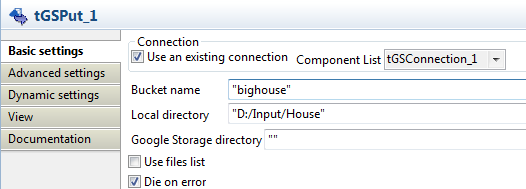
-
Select the Use an existing connection
check box and then select the connection you have configured earlier. -
In the Bucket name field, enter the name
of the bucket into which you want to upload files. In this example,
bighouse. -
In the Local directory field, browse to
the directory from which the files will be uploaded, D:/Input/House in this example.The files under this directory are shown below: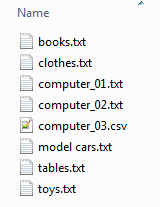
- Leave other settings as they are.
Document get from Talend https://help.talend.com
Thank you for watching.
Subscribe
Login
0 Comments