Writing the data into the database table
-
Double-click the tMSSqlOutput component to
open its Basic settings view in the Component tab.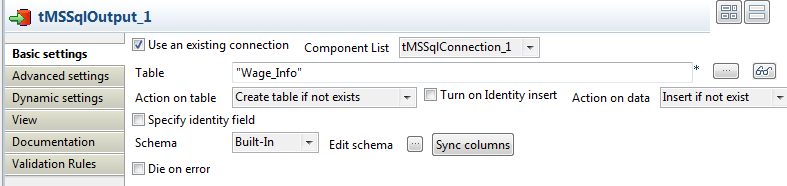
-
Type in required information for the connection or use the existing connection
you have configured before. In this example, we select the Use an existing connection check box. If multiple connections
are available, select the connection you want to use from the Component List drop-down list. -
In the Table field, type in the name of the
table you want to write the data to: Wage_Info in this example. You can also click the […] button next to the Table field to open a dialog box and select a proper
table. -
Select Create table if not exists from the
Action on table drop-down list. -
Select Insert if not exists from the
Action on data drop-down list. -
Click Sync columns to retrieve the schema
from the preceding component.
Document get from Talend https://help.talend.com
Thank you for watching.
Subscribe
Login
0 Comments