Basic settings of tMDMOutput
-
In the design workspace, click tMDMOutput to open its Basic
settings view.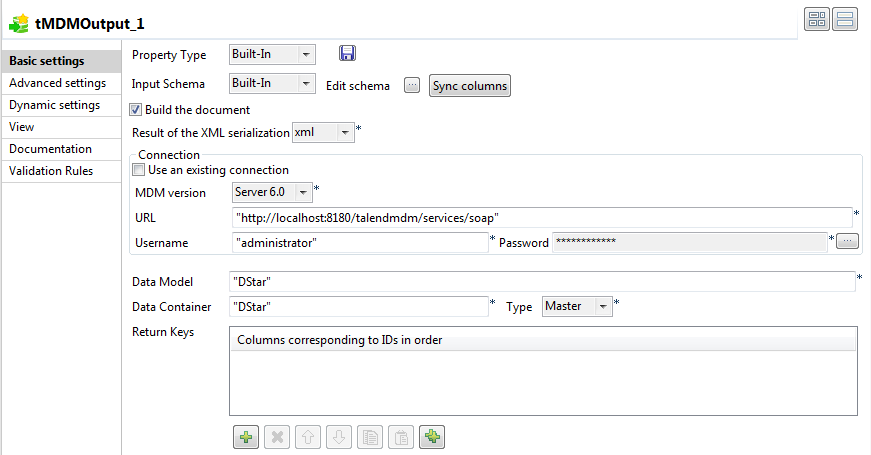
-
In the Input Schema
list, select Built-In and then click the
[…] button next to the Edit Schema field to define the structure of the
master data you want to load into the MDM server.The tMDMOutput
component basically generates an XML document, writes it in an output field, and
then sends it to the MDM server.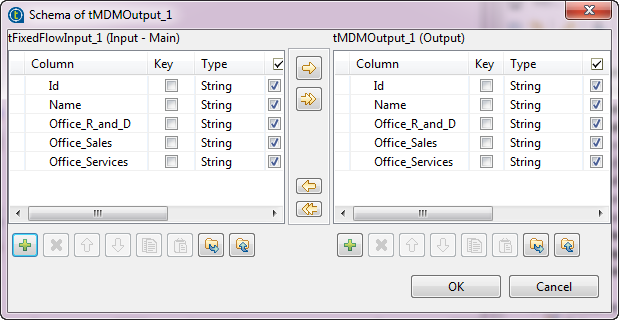
-
Click OK to proceed to
the next step.The Result of the XML
serialization list in the Basic
settings view is automatically filled in with the output xml column. -
In the URL field, enter
the URL to access the MDM server. -
In the Username and
Password fields, enter the
authentication information required to connect to the MDM server. -
In the Data Model field,
enter between quotes the name of the data model against which you want to
validate the master data you want to write. -
In the Data Container,
enter between quotes the name of the data container into which you want to write
the master data. -
Select the Is Update
checkbox if you only want to update some fields rather than the entire data
record.If you want to use this component to write on the MDM server a task resolved
in
Talend Data Stewardship Console
, select the
Add task id check box, and then enter the ID of
your choice or select the schema column you want to use as the ID.In this case, the MDM record on the MDM server will have a track back to the
resolved task fetched from
Talend Data Stewardship Console
. For further information, see
Talend Data Stewardship Console User Guide.The Talend Data Stewardship Console is
deprecated since Talend 6.4. Consider migrating to Talend Data Stewardship.
Document get from Talend https://help.talend.com
Thank you for watching.
Subscribe
Login
0 Comments