Configuring and executing the second Job
Then set the second Job in order to fetch the queuing messages from the MOM
server.
-
Drop the tMomInput component and a
tLogRow from the Palette to the design workspace.
-
Select the tMomInput to set the
parameters.
-
Select the MQ server from the list. In
this example, a JBoss messaging server is used. - Set the server Host and Port information.
-
Set the Message From and the Message Type to match the source and type
expected by the messaging server. -
The Schema is read-only and is made of
two columns: From and Message. -
Select the Keep listening check box and
set the verification frequency to 5 seconds.Note:When using the Keep Listening option,
you’ll need to kill the Job to end it. - No need to change any default setting from the tLogRow.
-
Save the Job and run it (when launching for the first time or if you
killed it on a previous run).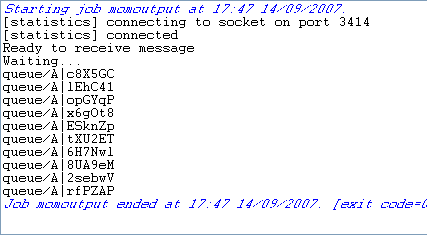 The messages fetched on the server are displayed on the console.
Document get from Talend https://help.talend.com
Thank you for watching.
Subscribe
Login
0 Comments