Configuring basic settings of tMDMInput to read master data from MDM
-
Double-click tMDMInput to open the Basic settings view.
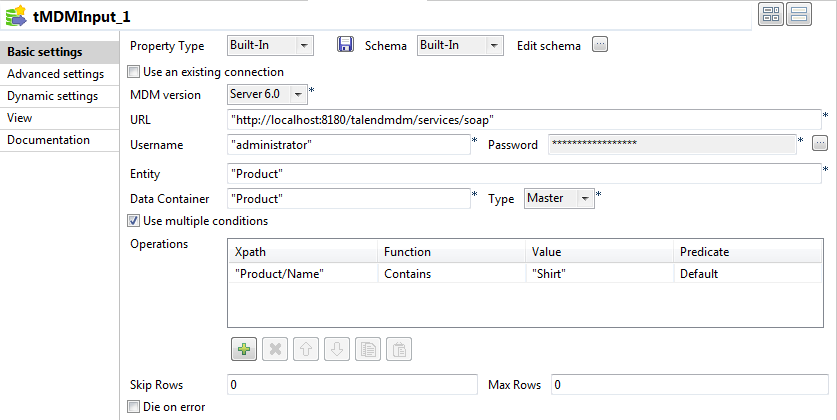
- In the Property Type list, select Built-In.
-
In the Schema list, select Built-In and click the […] button next to
Edit schema to open a dialog box and define the structure
of the master data you want to read from the MDM server.In this example, three columns are defined to fetch three elements from the
Product entity: Name,
Price, and Colors.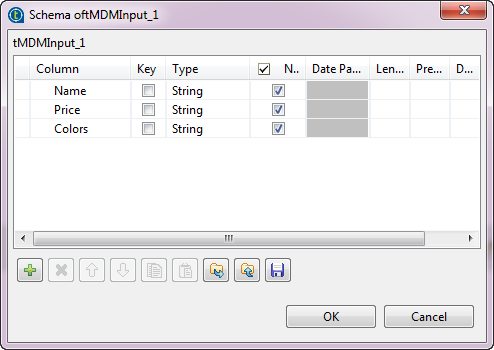
-
After you have defined the schema, click OK to close
this dialog box, and then click Yes in the [Propagate] dialog box to propagate the schema changes to tLogRow. - Enter the user name and password for accessing the MDM server.
-
In the Entity field, enter Product
between quotes. -
In the Data Container field, enter
Product between quotes. - Select Master from the Type list.
-
Define the query conditions in the Operations area.
In this example, we want to query the product data records whose names include
Shirt.- Click the [+] button to add a row.
-
Enter Product/Name between quotes in the Xpath field.
Apart from elements defined in entities, you can query metadata elements which are
also known as built-in elements. To query metadata elements from records in master
database, you need to follow the format of
metadata:<timestamp|task_id>when defining the path expression to
select the XML node to run the query on. - Select Contains from the Function list.
- Enter Shirt between quotes in the Value field.
Document get from Talend https://help.talend.com
Thank you for watching.
Subscribe
Login
0 Comments