Configuring data inputs and hash cache
-
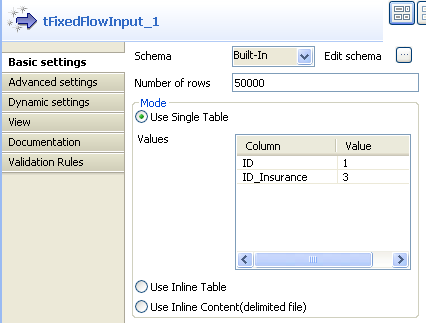
Double-click the first tFixedFlowInput component to display its Basic settings view.
-
Select Built-In from the Schema drop-down list.
Note:
You can select Repository from
the Schema drop-down list to fill
in the relevant fields automatically if the relevant metadata has
been stored in the Repository. For
more information about Metadata,
see the
Talend Studio User
Guide. -
Click Edit schema to define the data
structure of the input flow. In this case, the input has two columns:
ID and ID_Insurance, and then click OK to close the dialog box.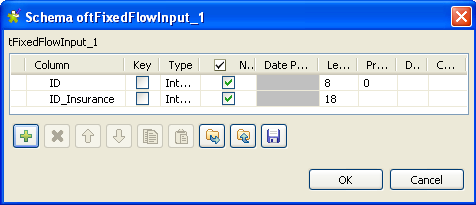
-
Fill in the Number of rows field to
specify the entries to output, e.g. 50000. -
Select the Use Single Table check
box. In the Values table and in the
Value column, assign values to the
columns, e.g. 1 for ID and 3
for ID_Insurance. -
Perform the same operations for the second tFixedFlowInput component, with the only difference in
the values. That is, 2 for ID and 4
for ID_Insurance in this case. -
Double-click the first tHashOutput to
display its Basic settings view.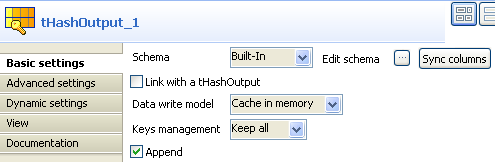
-
Select Built-In from the Schema drop-down list and click Sync columns to retrieve the schema from the
previous component. Select Keep all
from the Keys management drop-down list
and keep the Append check box
selected. - Perform the same operations for the second tHashOutput component, and select the Link with a tHashOutput check box.
Document get from Talend https://help.talend.com
Thank you for watching.
Subscribe
Login
0 Comments