Configuring data import
-
Double-click the tFileInputDelimited
component to open its Basic settings view
on the Component tab.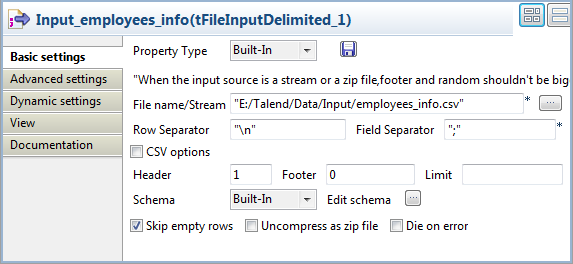
-
In the File name/Stream field, specify
the path to the CSV file that contains the employees data to read.The input CSV file used in this example is as follows:1234567891011employeeID;employeeName;age;hireDate;salary;managerID1;Rutherford Roosevelt;38;06-10-2008;13336.58;m52;Warren Adams;43;05-22-2008;11626.68;m63;Andrew Roosevelt;55;04-01-2007;10052.95;m44;Herbert Quincy;54;06-14-2007;10694.71;m65;Woodrow Polk;33;08-14-2007;13751.50;m46;Theodore Johnson;47;01-26-2008;12426.87;m67;Benjamin Adams;32;02-25-2008;10438.65;m48;Woodrow Harrison;51;10-11-2008;11188.27;m59;George Truman;40;04-28-2008;14254.49;m510;Harry Jackson;38;04-01-2008;12798.78;m6 -
In the Header field, specify the number
of rows to skip as header rows. In this example, the first row of the CSV
file is the header row. -
Click the […] button next to Edit schema to open the [Schema] dialog box, and define the input schema based on
the structure of the input file. In this example, the input schema is
composed of six columns: employeeID
(integer), employeeName (String),
age (Integer), hireDate (Date), salary (Double), and managerID (String).When done, click OK to close the
[Schema] dialog box and propagate the
schema to the next component.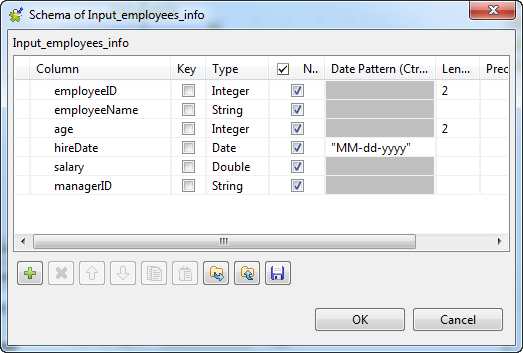
-
Double-click the tNeo4jRow component to
open its Basic settings view on the
Component tab.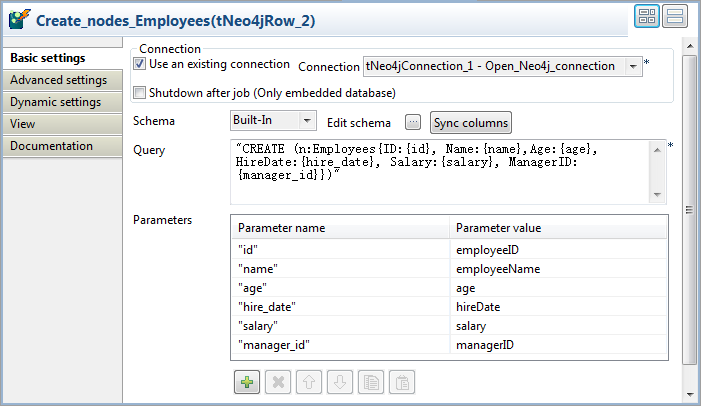
-
Select the Use an existing connection
check box to reuse the Neo4j database connection opened by the tNeo4jConnection component, which is the only
connection component used in this example. -
In the Query field, type in the Cypher
query to be executed by the component.In this example, type in the following query to create nodes with the
label Employees and six properties, to
hold the data from the input flow:-
ID, which will take the value
of the variable parameter id, -
Name, which will take the value
of the variable parameter name, -
Age, which will take the value
of the variable parameter age, -
HireDate, which will the value
of the variable parameter hire_date, -
Salary, which will take the
value of the variable parameter salary, and -
ManagerID, which will the value
of the variable parameter manager_id.
1"CREATE (n:Employees{ID:{id}, Name:{name}, Age:{age}, HireDate:{hire_date}, Salary:{salary}, ManagerID:{manager_id}})" -
-
In the Parameters table, type in the
variable parameters in the Parameter field
in accordance with your Cypher query , and map each of them with an input
schema column by selecting it from the Parameter
value list field.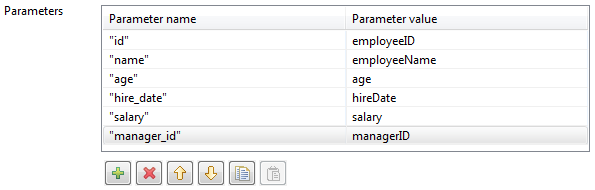
Document get from Talend https://help.talend.com
Thank you for watching.
Subscribe
Login
0 Comments