Configuring data record deletion
-
In the design workspace, double-click the tMDMDelete component to display the Basic
settings view and set the component properties.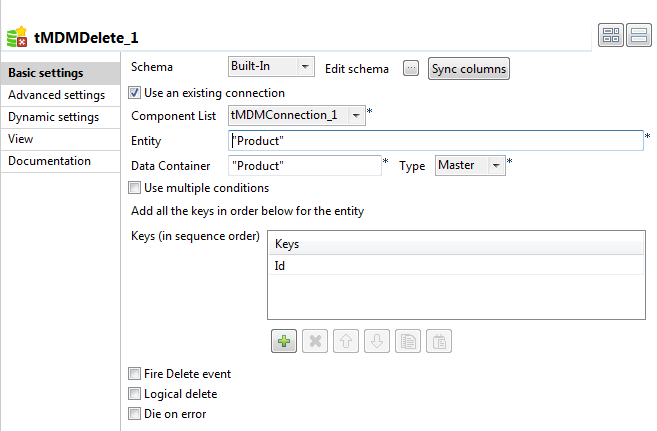
-
From the Schema list, select Built-in and click the three-dot button next to the Edit Schema field to describe the structure of the master data in the MDM
hub.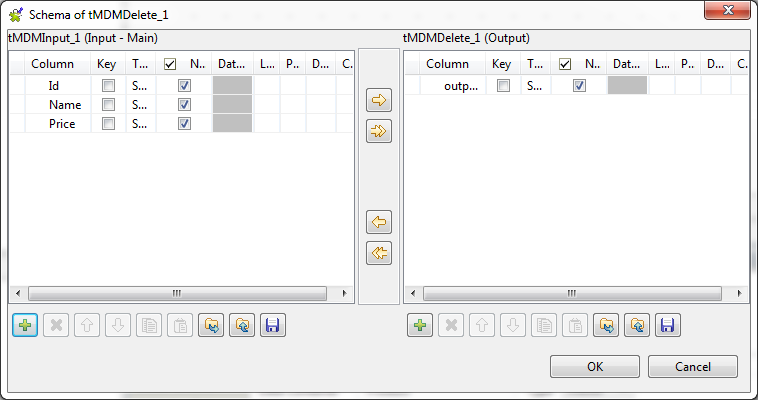
-
Click the plus button to the right to add one column of the type String. In this example, name this column
outputXML. Click OK to close the
dialog box and proceed to the next step. -
Select the Use an existing connection check box,
and from the Component List list that appears, select
the component you have configured to open your MDM server connection.In this scenario, only one MDM server connection exists, so simply use the default
selection. -
In the Entity field, enter the name of the business
entity that holds the master data you want to delete, the Product
entity in this example. -
In the Data Container, enter the name of the data
container that holds the data to be deleted, Product in this
example. -
In the Keys table, click the plus button to add a
new line. In the Keys column, select the column that
holds the key of the Product entity. Here, the key of the
Product entity is set on the Id field.Note:If the entity has multiple keys, add as many line as required for the keys and
select them in sequential order. -
If needed, select the Fire Delete event check box,
so that the delete event will be generated and written into UpdateReport. -
Select the Logical delete check box if you do not
want to delete the master data permanently. This will send the deleted data to the
Recycle bin. Once in the Recycle bin, the master data can be restored or permanently
deleted. If you leave this check box clear, the master data will be permanently
deleted.
Document get from Talend https://help.talend.com
Thank you for watching.
Subscribe
Login
0 Comments