Configuring data retrieval
-
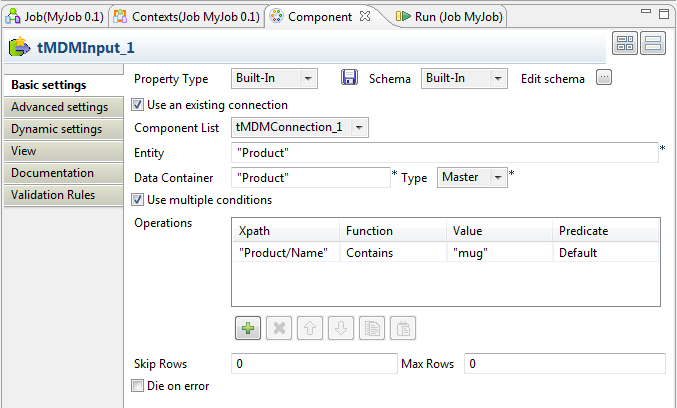
Double-click tMDMInput to display its Basic settings view and define the component properties.
-
From the Property Type list, select Built-in to complete the fields manually.
If you have stored the MDM connection information in the repository metadata, select
Repository from the list and the fields will be
completed automatically. -
From the Schema list, select Built-in and click […] next to
Edit schema to open a dialog box.Here you can define the structure of the master data you want to read in the MDM
hub.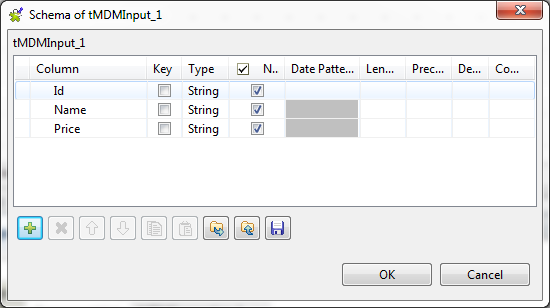
-
The master data is collected in a three-column schema of the type String: Id, Name and
Price. Click OK to close the
dialog box and proceed to the next step. -
Select the Use an existing connection check box,
and from the Component List list that appears, select
the component you have configured to open your MDM server connection.In this scenario, only one MDM server connection exists, so simply use the default
selection. -
In the Entity field, enter the name of the business
entity that holds the data record(s) you want to read, between quotation marks. Here, we
want to access the Product entity. -
In the Data Container field, enter the name of the
data container that holds the master data you want to read, between quotation marks. In
this example, we use the Product container.Note:The Use multiple conditions check box is selected
by default. -
In the Operations table, define the conditions to
filter the master data you want to delete as follows:- Click the plus button to add a new line.
-
In the Xpath column, enter the Xpath and the tag
of the XML node on which you want to apply the filter, between quotation
marks. This example works with the Product
entity, so enter “Product/Name”. -
In the Function column, select the function you
want to use. In this scenario, use the Contains function. -
In the Value column, enter the
value of your filter. This example is to filter the master data where
the Name contains mug.
-
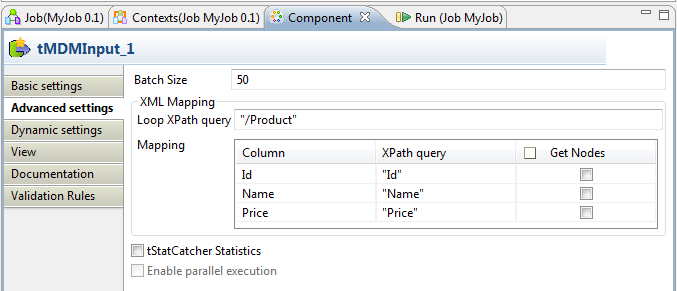
In the Component view, click Advanced settings to set the advanced parameters.
-
In the Loop XPath query field, enter the structure
and the name of the XML node on which the loop is to be carried out, between quotation
marks. -
In the Mapping table and in the XPath query column, enter the name of the XML tag in which you
want to collect the master data, next to the corresponding output column name, between
quotation marks.
Document get from Talend https://help.talend.com
Thank you for watching.
Subscribe
Login
0 Comments