Configuring tFixedFlowInput
-
Double-click tFixedFlowInput to display
its Basic settings view and define the
component properties.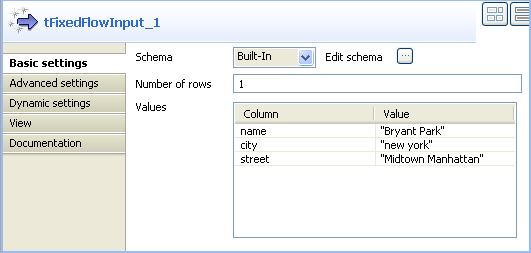
-
Set Schema type to Built-in and click the three-dot button next to Edit schema to display a dialog box where you can
define the input schema. -
Click the plus button and add the input schema columns, three in this
example: name, city and
street. -
Click OK to close the dialog box and
accept propagating the changes when prompted by the system.The three schema columns display automatically in the Values list. -
Click in the Value column and enter a
value for each of the input columns.
Document get from Talend https://help.talend.com
Thank you for watching.
Subscribe
Login
0 Comments