Configuring tSortRow
-
Double-click tSortRow to open its
Component view.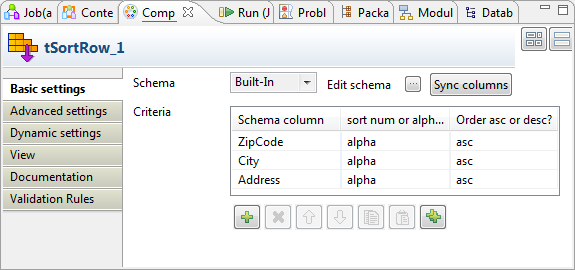
-
Under the Criteria table, click the

button three times to add three rows to the
table. -
In the Schema column column, select, for
each row, the schema column to be used as the sorting criterion. In this
example, select ZipCode, City and Address, sequentially. -
In the Sort num or alpha? column, select
alpha for all the three rows. -
In the Order asc or desc column, select
asc for all the three rows. -
If the schema does not appear, click the Sync
columns button to retrieve the schema from the preceding
component. -
Click Advanced settings to open its
view.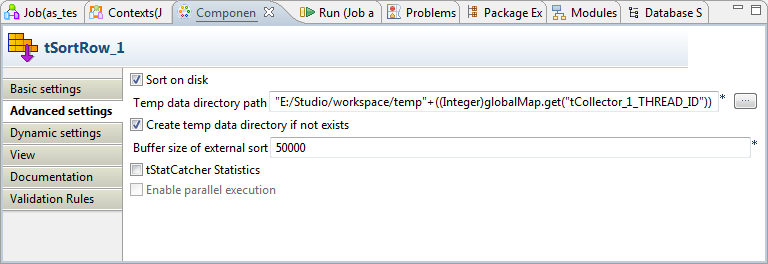
-
Select Sort on disk. Then the Temp data directory path field and the Create temp data directory if not exist check box
appear. -
In Temp data directory path, enter the
path to, or browse to the folder you want to use to store the temporary data
processed by tSortRow. In this approach,
tSortRow is enabled to sort
considerably more data.As the threads will overwrite each other if they are written in the same
directory, you need to create the folder for each thread to be processed
using its thread ID. To do this, you can drop directly the global variable
THREAD_ID of tCollector from the Outline
view into this field; then the corresponding code is generated
automatically, reading:
This123((Integer)globalMap.get("tCollector_1_THREAD_ID"))
makes the path read like:“E:/Studio/workspace/temp”+((Integer)globalMap.get(“tCollector_1_THREAD_ID”)).If the Outline view does not appear in the Studio, you
can display it by selecting it from the [Show
view] dialog box. For further information, see
Talend Studio User Guide. -
Ensure that the Create temp data directory if not
exists check box is selected.
Document get from Talend https://help.talend.com
Thank you for watching.
Subscribe
Login
0 Comments