Counting the download of each product
-
Double-click tAggregateRow to open its
Component view.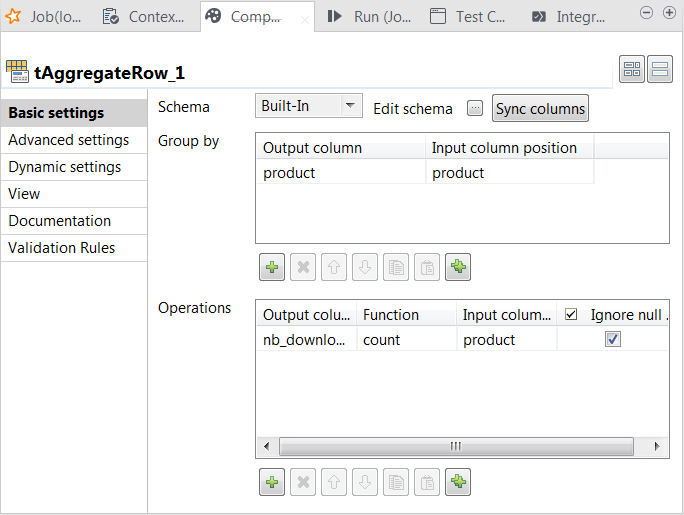
-
Click the […] button next to Edit
schema to open the schema editor.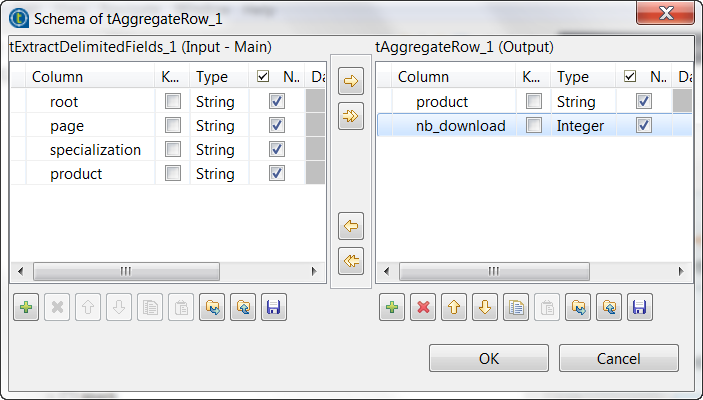
-
On the output side, click the [+] button two times to
add two rows to the output schema table and rename these new schema columns to
product and nb_download, respectively. -
Click OK to validate these changes and accept
the propagation prompted by the pop-up dialog box. -
In the Group by table, add one row by
clicking the [+] button and select product for both the Output
column column and the Input column
position column. This passes data from the product column of the input schema to the product column of the output schema. -
In the Operations table, add one row by
clicking the [+] button. -
In the Output column column, select nb_download, in the Function column, select count and
in the Input column position column, select
product.
Document get from Talend https://help.talend.com
Thank you for watching.
Subscribe
Login
0 Comments