Creating the first subjob
To do this, proceed as follows:
-
Drop the following components from the Palette onto the design workspace: tFixedFlowInput from the Misc family and tMysqlOutput from the Databases > Mysql
family. -
Link tFixedFlowInput to tMysqlOutput using a Row > Main
connection. -
Double-click tFixedFlowInput to display
its Basic settings view: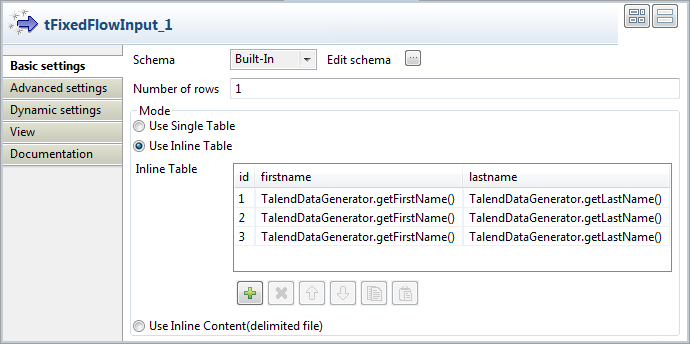
-
Click the […] button next to Edit schema to open the schema editor.
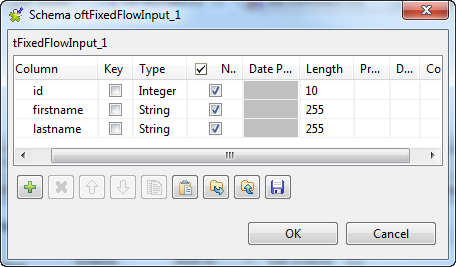
-
In the schema editor, click the [+]
button three times to add three lines and set them as displayed in the above
screenshot. - Click Ok.
-
Back to tFixedFlowInput
Basic settings view, in the Mode area, select the Use
inline table option. -
Under the inline table, click the [+]
button three times to add three rows in the table. -
In the inline table, click the id field
of the first row and type in 1. -
Click the firstname field of the first
row, press Ctrl+Space to display the
autocompletion list and select the TalendDataGenerator.getFirstName() variable in the
list. -
Click the lastname field of the first
row, press Ctrl+Space to display the
autocompletion list and select the TalendDataGenerator.getLastName() variable in the
list. -
Do the same for the two following rows to obtain the settings displayed in
the screenshot. -
Double-click tMysqlOutput to display its
Basic settings view: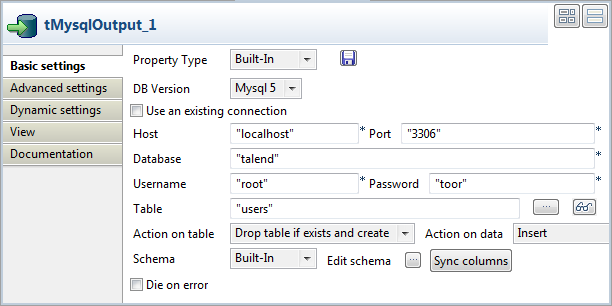
-
From the Property Type list, leave
Built-in and fill in the Host, Port,
Database, Username and Password
fields manually. If you centralized your connection information to the
database in the Metadata > DB Connections node of the Repository, you can select Repository from the list and the fields will be
automatically filled in.For more information about storing metadata, see
Talend Studio User Guide. -
In the Table field, type in the name of
the table in which the data will be loaded, for example: users. -
From the Action on table list, select
Drop table if exists and create, select
Insert from the Action on data list. -
Click Sync columns to retrieve the schema
coming from the previous component.
Document get from Talend https://help.talend.com
Thank you for watching.
Subscribe
Login
0 Comments