Creating the MapReduce program
-
Double-click tJavaMR to open its
Component view.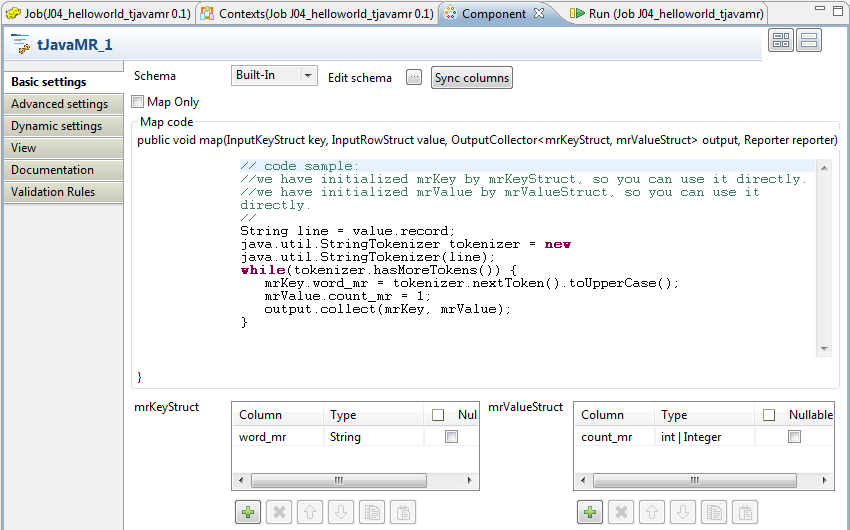
-
Under the mrKeyStruct table, click the

button once to add one row.
-
Rename that row to word_mr. This is the
key part of the key/value pair to be used by the Map/Reduce program being
created. In the map method, you need to write mrKey.word_mr to represent the keys to be outputted to a
reducer. -
Under the mrValueStruct table, click the
button once to add one row.
-
Rename that row to count_mr. This is
the value part of the above-mentioned key/value pair. In the map method, you
need to write mrValue.count_mr to
represent the values to be outputted to a reducer. -
Click the

button next to Edit
schema to open the schema editor. -
On the side of the schema of tJavaMR,
click thebutton to add two columns and name them to word_output and count_output, respectively. This defines the structure of
the data to be outputted.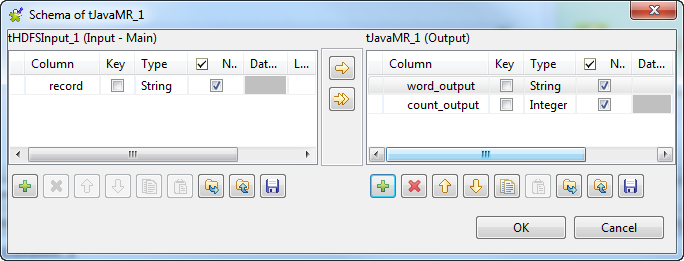
- In the Type column, select Integer for count_output.
-
In the Map code editing field, edit the
body of the map method. In this example, the code is as follows:123456789String line = value.record;java.util.StringTokenizer tokenizer = new java.util.StringTokenizer(line);while(tokenizer.hasMoreTokens()) {mrKey.word_mr = tokenizer.nextToken().toUpperCase();mrValue.count_mr = 1;output.collect(mrKey, mrValue);}This method is used to split the input data into words, change each word
to upper case and create and output key/value pairs such as (HELLO, 1) and (WORLD,
1) to the reducer.Note that at runtime, these pairs are automatically shuffled and sorted to
take the form of(key, list of values)before being process by
the reduce method. -
In the Reduce code editing field, edit
the body of the reduce method. In this example, the code is as
follows:12345678910int count = 0;while(values.hasNext()){mrValueStruct value = values.next();count += value.count_mr;}outputRow.word_output = key.word_mr;outputRow.count_output = count;output.collect(NULL, outputRow);This reduce method is used to make the sum of the values of the list in
each(key, list of values)pair and map the results to the
columns of the output schema.
Document get from Talend https://help.talend.com
Thank you for watching.
Subscribe
Login
0 Comments