Loading the movie data
-
Double-click the tFixedFlowIput component to
open its Component view.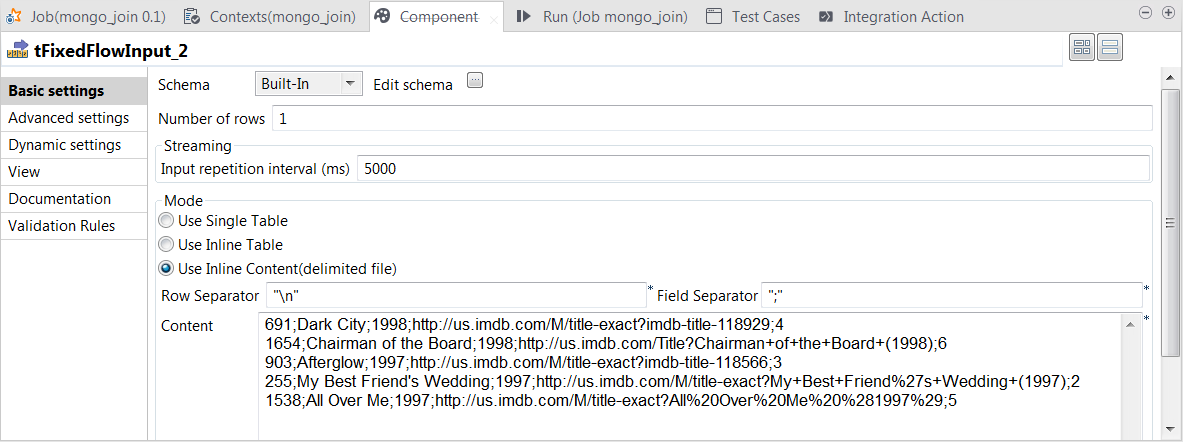
- Click the […] button next to Edit schema to open the schema editor.
-
Click the [+] button to add the schema
columns as shown in this image.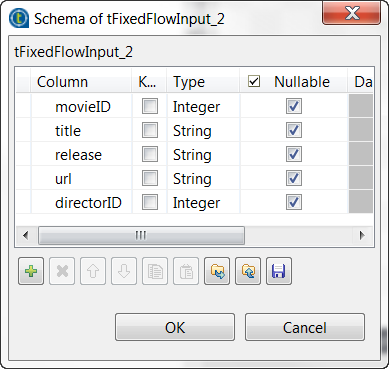
-
Click OK to validate these changes and accept
the propagation prompted by the pop-up dialog box. -
In the Input repetition interval field, enter
the time interval at the end of which tFixedFlowInput sends the movie data another time. This allows you
to generate a stream of data. -
In the Mode area, select the Use Inline Content radio button and paste the following
data into the Content field that is
displayed.
691;Dark City;1998;http://us.imdb.com/M/title-exact?imdb-title-118929;4

1654;Chairman of the Board;1998;http://us.imdb.com/Title?Chairman+of+the+Board+(1998);6

903;Afterglow;1997;http://us.imdb.com/M/title-exact?imdb-title-118566;3

255;My Best Friend's Wedding;1997;http://us.imdb.com/M/title-exact?My+Best+Friend%27s+Wedding+(1997);2

1538;All Over Me;1997;http://us.imdb.com/M/title-exact?All%20Over%20Me%20%281997%29;5
-
In the Field separator field, enter a
semicolon (;).
Document get from Talend https://help.talend.com
Thank you for watching.
Subscribe
Login
0 Comments