Loading the reference file and setting up an inner join
-
Double-click tPigJoin to open its
Basic settings view.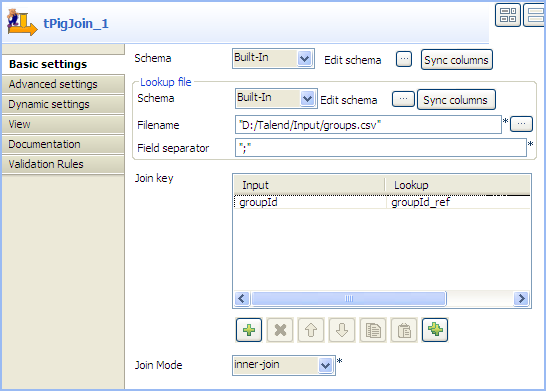
-
Click the […] for the main schema to
open the [Schema] dialog box.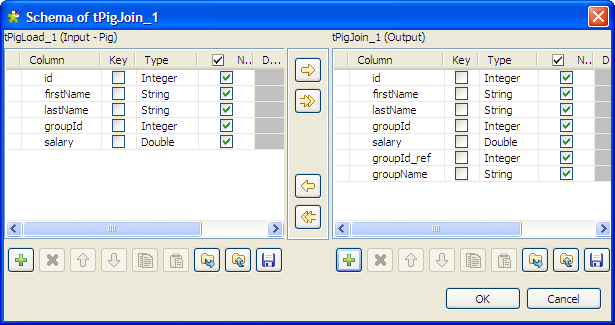
-
Check that input schema is correctly retrieved from the preceding
component. If needed, click the [->>]
button to copy all the columns of the input schema to the output schema.
-
Click the [+] button under the output
panel to add new columns according to the data structure of the reference
file, groupId_ref (integer) and groupName (string) in this example. Then click
OK to close the dialog box. -
Click the […] for the schema lookup
flow to open the [Schema] dialog
box.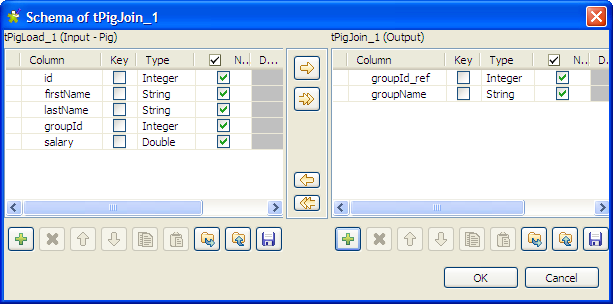
-
Click the [+] button under the output
panel to add two columns: groupId_ref
(integer) and groupName (string), and
then click OK to close the dialog
box. -
In the Filename field, specify the full
path to the reference file. -
Click the [+] button under the Join key table to add a new line, and select
groupId and groupId_ref
respectively from the Input and Lookup lists to match data from the main input
flow with data from the lookup flow based on the group ID. - From the Join Mode list, select inner-join.
Document get from Talend https://help.talend.com
Thank you for watching.
Subscribe
Login
0 Comments