Loading the source data into an empty table
-
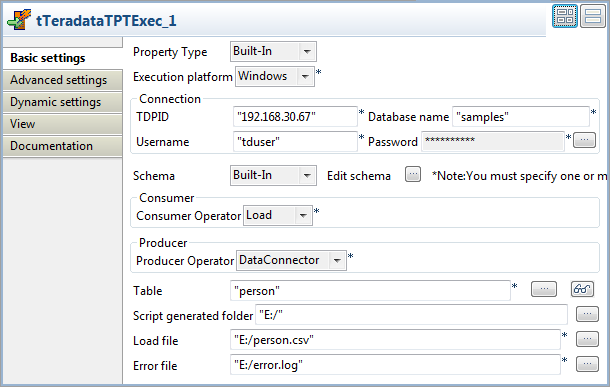
Double-click tTeradataTPTExec to open its Basic settings view.
-
Fill in the TDPID, Database name, Username,
and Password fields with your Teradata
database connection details. -
In the Table field, enter the name of the
table into which the source data will be loaded. In this example, it is
person. -
In the Script generated folder field,
browse to the directory under which the Teradata Parallel Transporter script
file will be created during the Job execution. In this example, it is
E:/. -
In the Load file field, browse to the
file that contains the source data. In this example, it is E:/person.csv. -
In the Error file field, specify the file
in which log messages will be recorded. In this example, it is E:/error.log. -
Click the […] button next to Edit schema to open the schema editor.
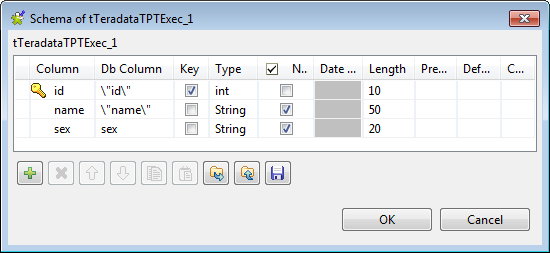 Click the [+] button to add three
columns: id of the integer type,
name and sex of the string type. Note that id and name in Db Column are enclosed in a pair of “ since they are Teradata database
keywords.Click OK to validate these changes and
close the schema editor. -
Click Advanced settings to open its view,
and then select the Apply TPT consumer operator
optional attributes check box and click the [+] button below the Optional attributes table to add the following attributes
needed: ErrorLimit, ErrorTable1, QueryBandSessInfo, and TraceLevel.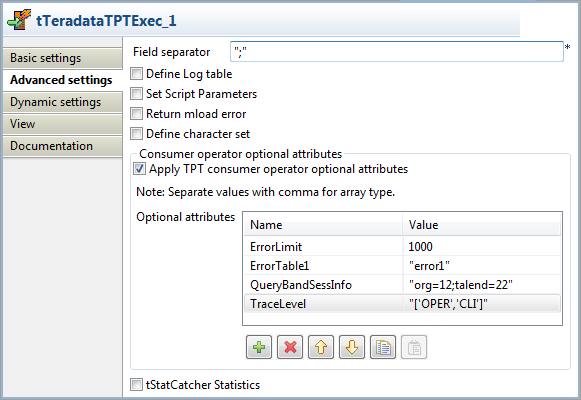 Note:
Note:For VARCHAR attributes, enter their values between double quotation
marks.
Document get from Talend https://help.talend.com
Thank you for watching.
Subscribe
Login
0 Comments