Reading and caching the sample data
-
Double-click the first tFileInputInput component to
open its Component view. -
Click the […] button next to Edit schema and in the pop-up schema dialog box, define the
schema by adding two columns latitude and
longitude of Double type.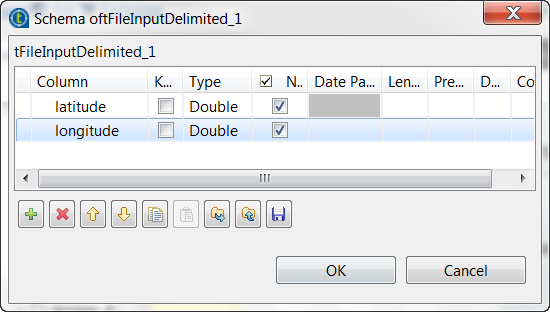
-
Click OK to validate these changes and accept the
propagation prompted by the pop-up dialog box. -
Select the Define a storage configuration
component check box and select the tHDFSConfiguration component to be used.tFileInputDelimited uses this configuration
to access the sample data to be used as training set. -
In the Folder/File field, enter the directory
where the training set is stored. -
Double-click the tReplicate component to open its
Component view. -
Select the Cache replicated RDD check box and from
the Storage level drop-down list, select
Memory only. This way, this sample data is
replicated and stored in memory for use as test set.
Document get from Talend https://help.talend.com
Thank you for watching.
Subscribe
Login
0 Comments