Reading data from a database table
-
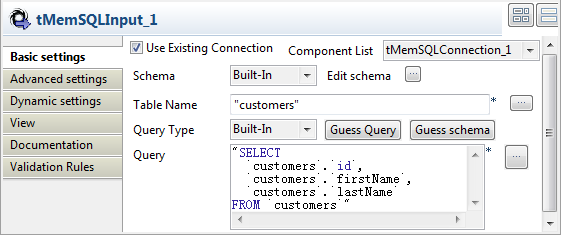
Double-click tMemSQLInput to open its Basic Settings view in the Component tab.
-
Select the Use Existing Connection check
box. The Component List is filled in
automatically with tMemSQLConnection_1. -
Set the Schema as Built-in and click Edit
schema to define the data structure of the database table to
read data from.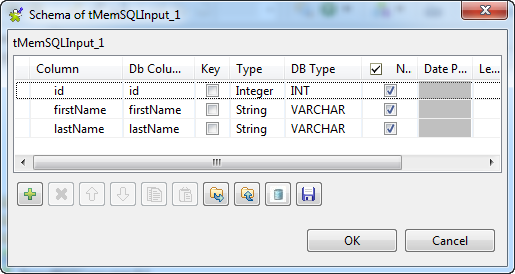 Click the [+] button to add the rows that
you will use to define the schema, three columns in this example
id, firstName, and
lastName.Under Column, click in the fields to enter the
corresponding column names.Click the field under Type to define the type of
data.Click OK to close the schema editor. -
Fill the Table field with the database
table, customers in this example.Alternatively, click the […] button
next to the Table Name field to select the
database table of interest. A dialog box opens showing a tree diagram of all
the tables in the selected database. Select customers
and click OK to close the dialog
box.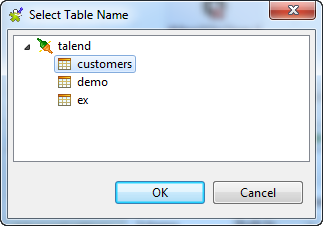
-
Set the Query Type as Built-In. Click the Guess
Query button. The Query box
is filled in automatically to retrieve all columns from the selected table.
-
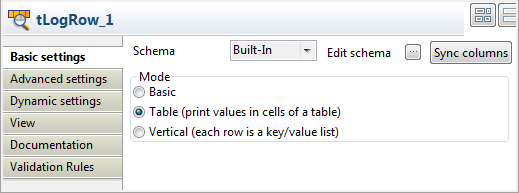
Double-click tLogRow to set its Basic settings in the Component tab.
-
In the Mode area, select Table (print values in cells of a table) for a
better display of the results. - Save the Job.
Document get from Talend https://help.talend.com
Thank you for watching.
Subscribe
Login
0 Comments