Writing the sample data to the MapR OJAI database
-
Double-click tMapROjaiOutput to open
its Component view.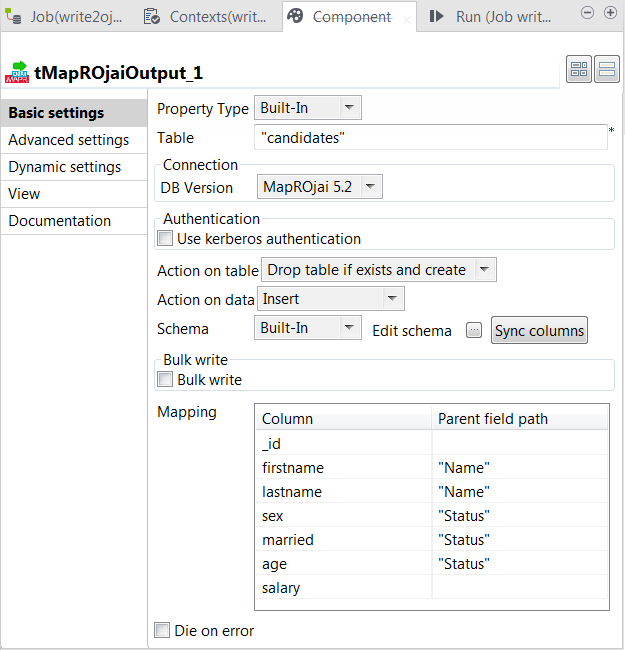
- In the Table field, enter the name of the table to be used in your MapR OJAI database.
-
From the DB Version list, select the
MapR OJAI database version you are using.At runtime, tMapROjaiOutput automatically reads the connection information to the database from the optmaprconfmapr-clusters.conf file of your MapR client.
In this example, the content of this file reads as follows:1mapr521 mapr521:7222 - From the Action on table drop-down list, select Drop table if exists and create and then from the Action on data drop-down list, select Insert.
-
In the Mapping table, the columns from the schema has
automatically appears in the Column column. In the
Parent field path column, enter
Name within double quotation marks in the
firstname row and the lastname row
and enter Status within double quotation marks in the
sex row, the married row and the
age row.This configuration groups the candidates’ first names and last names in the Name field and their sexes, marriage status and ages in the Status field in the outputted data flow.
- Press F6 to run the Job.
Parent topic: Writing candidate data in a MapR-DB OJAI database
Document get from Talend https://help.talend.com
Thank you for watching.
Subscribe
Login
0 Comments