Talend Solr High Speed Update Component – Talend Custom Components

Talend Solr High Speed Update Component
Name: Talend Solr High Speed Update Component
Icon: Talend Solr High Speed Update Component
Author: tdgadmin
Resources:
Download:
Install Instructions:

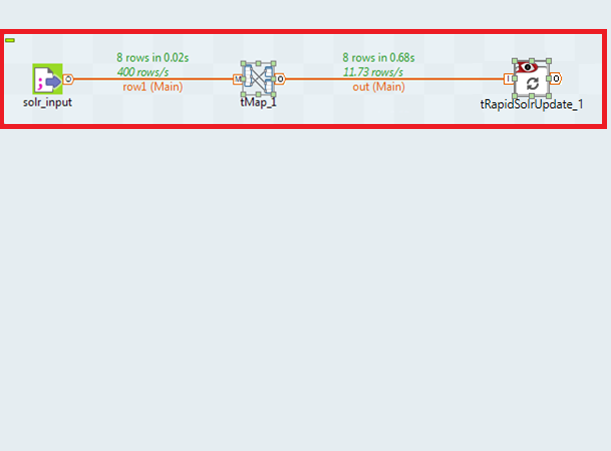
1. Drop the following components: tFileInputDelimited, tMap, tRapidSolrUpdate from the Palette to the design workspace.
2. Connect the components using Row main connections.
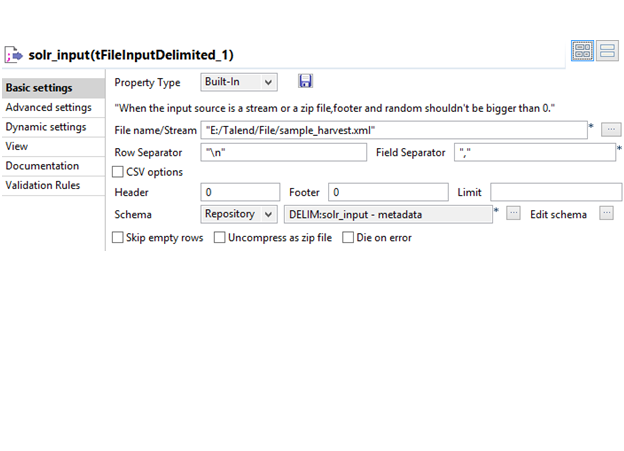
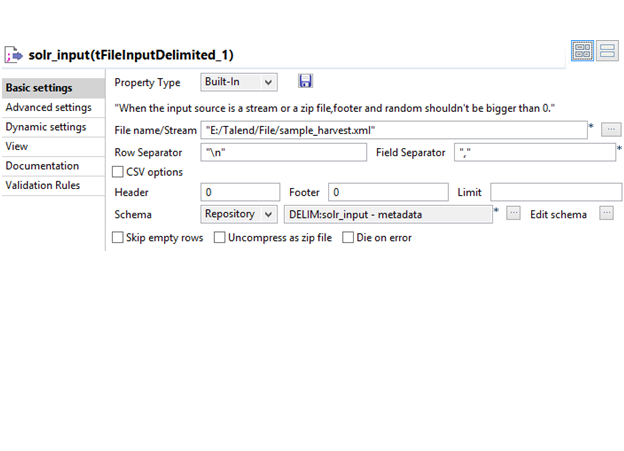
3. On the tFileInputDelimited Component (Input) view, set the file path to the file to be create list Object.
4. Connect the flow line to all component, Save Job and press F6 to execute it and data ingestion is done at solr Core URL.

Example: Coming soon…
Features:

– Designed and Developed by T/DG Team for faster data transfer between Solr and other data sources. Four Different Talend components:
Insert, Read, Update, Delete
– 30% faster in terms of performance than currently available Solr Component in Talend Exchange
– Built on latest release of Apache Solr, utilizes Concurrent APIs of Solr
– Can be consumed through Talend Open Studio Component Palette

Overview:

Function : To update existing documents in solr index.

Purpose : tRapidSolrUpdate help to Update existing solr documents using concurrent APIs

Important Terminology
– Schema : A schema is a row description, i.e. it defines the number of fields to be processed and passed on to the next component. The schema is either Built-in or stored remotely in the Repository.
Following click events are supported:
• Click Edit Schema to make changes to the schema. If the current schema is of the Repository type, three options are available:
• View schema: choose this option to view the schema only.
• Change to built-in property: choose this option to change the schema to Built-in for local changes.
• Update repository connection: choose this option to change the schema stored in the repository and decide whether to propagate the changes to all the Jobs upon completion. If you just want to propagate the changes to the current Job, you can select No upon completion and choose this schema metadata again in the Repository Content window.
• Built-in: The schema will be created and stored locally for this component only.
Repository: The schema already exists and is stored in the Repository, hence can be reused in various projects and Job flowcharts.

– Thread Count : Number of threads to running while indexing on solr
– Advanced settings : tStatCatcher Statistics : Select this check box to collect the log data at component level.

Usage : This component can be used as intermediate step in a data flow.
Limitation : n/a

Talend Solr High Speed Update Component sample

Talend Solr High Speed Update Component v_0.1__1
Talend Solr High Speed Update Component v_0.1__2

Release Notes:

Release version: 0.1 – 2016-01-20 10:26:03

Compatible:
  • 5.0 (obsolete)
  • 5.1 (obsolete)
  • 5.2 (obsolete)
  • 5.3 (obsolete)
  • 5.4 (obsolete)
  • 5.5 (obsolete)
  • 5.6 (obsolete)
  • 6.0 (obsolete)
  • 6.1 (obsolete)
  • 6.2 (obsolete)

Document get from Talend Exchange
Thank you for watching.

Was this article helpful?
Subscribe
Notify of
guest
0 Comments
Inline Feedbacks
View all comments
0
Would love your thoughts, please comment.x
()
x