Bulk-writing the movies data into Neo4j
-
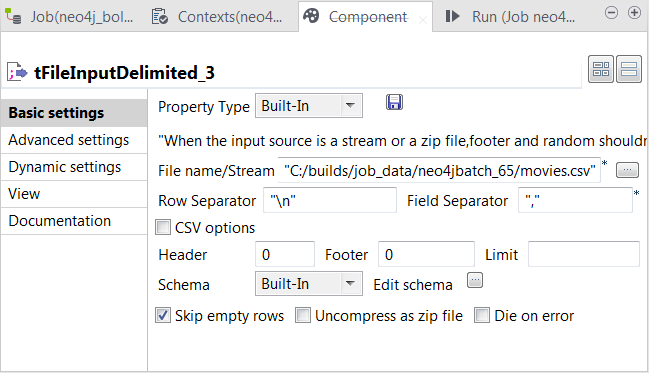
Double-click the second tFileInputDelimited component to open its Component view.
-
In the File name/Stream field, enter the path or browse to the CSV file that describes the movies’ IDs, names, release years and their labels to be used in Neo4j.
The input CSV file used in this example reads as follows:
123tt0133093,"The Matrix",1999,Moviett0234215,"The Matrix Reloaded",2003,Movie;Sequeltt0242653,"The Matrix Revolutions",2003,Movie;SequelThe double quotation marks on the movie names are not mandate.
-
Click the […] button next to Edit schema to open the schema editor, and define the input schema based on
the structure of the input file.In this example, the columns are id,
title, released and
label.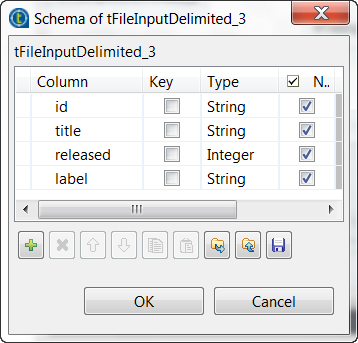
-
Click OK to close this editor and accept the propagation
of the schema to the next component. -
In the Field separator field, enter a comma (,) to
replace the default semicolon (;). -
Double-click the second tNeo4jBatchOutput component to open its
Component view.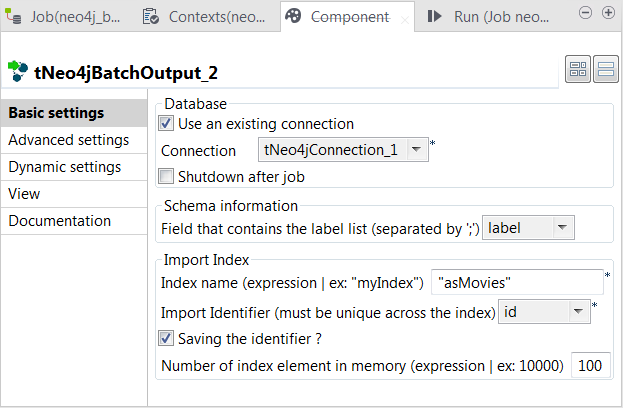
-
Select the Use an existing connection
check box to reuse the Neo4j database connection opened by the tNeo4jConnection component. - Verify that the Shutdown after Job check box is clear.
- From the Field that contains the label list drop-down list, select the column that provides labels.
- In the Index name field, enter the name of the index to be created for the nodes.
- From Import identifier drop-down list, select the column that provides IDs.
Document get from Talend https://help.talend.com
Thank you for watching.
Subscribe
Login
0 Comments