Computing suspect duplicates, exact duplicates and unique rows
-
Double-click tMatchPairing to
display the Basic settings view and define the
component properties.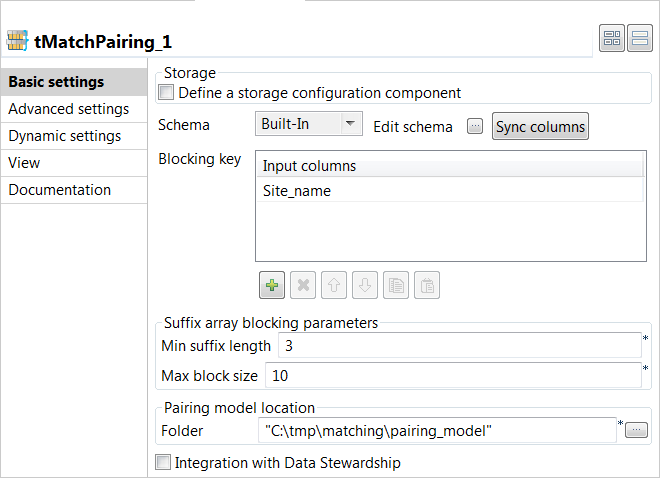
-
Click Sync columns to retrieve the schema defined in
the input component. -
In the Blocking Key table, click the
[+] button to add a row. Select the column you want
to use as a blocking key, Site_name in this
example.The blocking key is constructed from the agency name and is used to
generate the suffixes used to group pairs of records. -
In the Suffix array blocking parameters section:
-
In the Min suffix length field, set the
minimum suffix length you want to reach or stop at in each
group. -
In the Max block size field, set the maximum
number of the records you want to have in each block. This helps
filtering data in large blocks where the suffix is too common.
-
In the Min suffix length field, set the
-
In the Folder field, set the path to the local
folder where you want to generate the pairing model file.If you want to store the model in a specific file system, for example S3
or HDFS, you must use the corresponding component in the Job and select
the Define a storage configuration component
check box in the component basic settings. -
Click Advanced settings and set the below
parameters:-
In the Filtering threshold field, enter a
value between 0.2 and 0.85 to filter the pairs of suspect records
based on the calculated scores.This value helps to exclude the pairs which are not very similar.
The higher the value is, the more similar the records are. -
Leave the Set a random seed check box clear
as you want to generate a different sample by each execution of the
Job. -
In the Number of pairs field, enter the size
of the suspect pairs sample you want to generate. -
When configured with Talend Data Stewardship, enter the maximum number of the tasks to load per a
commit in the Max tasks per commit
field.
-
In the Filtering threshold field, enter a
Document get from Talend https://help.talend.com
Thank you for watching.
Subscribe
Login
0 Comments