Computing suspect pairs and unique rows
-
Double-click the first tFileOutputDelimited
component to display the Basic settings view and
define the component properties.You have already accepted to propagate the schema to the output
components when you defined the input component. -
Clear the Define a storage configuration component
check box to use the local system as your target file system. -
Click the […] button next to Edit
schema and use the [+] button in the
dialog box to add the columns from the reference data set to the schema.You must add _ref at the end of the column names
to be added to the suspect duplicates output. In this example:
Original_id_ref,
Source_ref,
Site_name_ref and
Address_ref.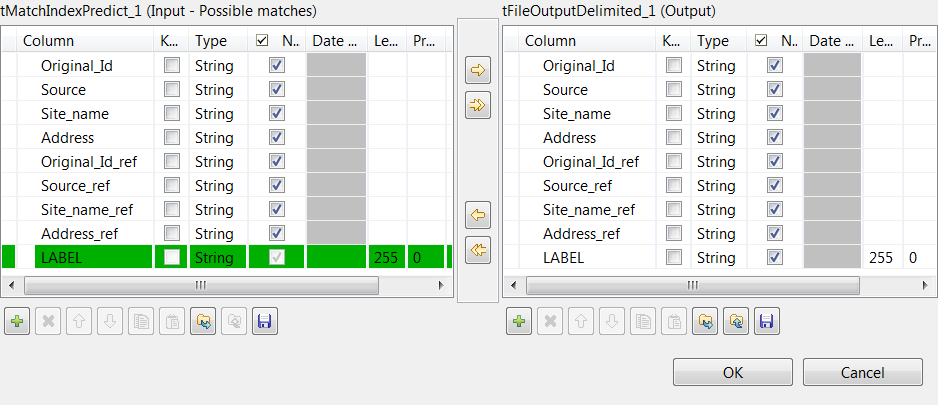
-
In the Folder field, set the path to the folder
which will hold the output data. -
From the Action list, select the operation for
writing data:-
Select Create when you run the Job for the
first time. -
Select Overwrite to replace the file every
time you run the Job.
-
- Set the row and field separators in the corresponding fields.
-
Select the Merge results to single file check box,
and in the Merge file path field set the path where
to output the file of the suspect record pairs. -
Double-click the second tFileOutputDelimited
component and define the component properties in the Basic
settings view, as you do with the first component.This component creates the file which holds the unique rows generated
from the input data. -
Press F6 to save and execute the
Job.
the matching records from the reference data set indexed in Elasticsearch and labels
the suspect pairs.

another file.

You can now clean and deduplicate the unique rows and use
tMatchIndex to add them to the reference data set stored in
Elasticsearch.