Configuration in the tMap editor
-
Double-click tMap to open its
editor.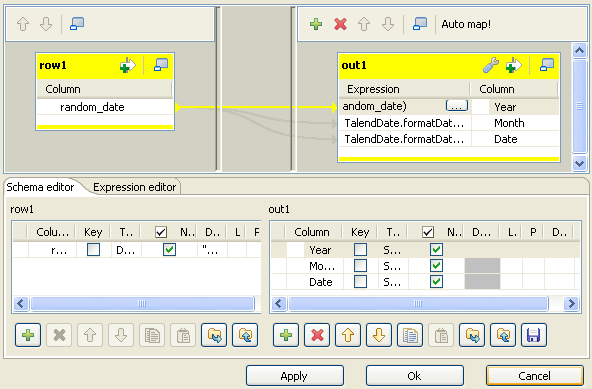
-
On the Schema editor view on the lower
part of the tMap editor, under the
out1 table, click the plus button to
add three rows. -
In the Column column of the out1 table, type in the new names for the three
newly added rows. They are Year,
Month, and Date. These rows
are then added automatically into the out1
table on the upper part of the tMap
editor. -
In the out1 table on the upper part of
the tMap editor, click the Expression column in the
Year row to locate the cursor. -
Press Ctrl+space to open the drop-down
variable list. -
Double-click TalendDate.formatDate to
select it from the list. The expression to get the date displays in the
Year row under the Expression column. The expression is
TalendDate.formatDate("yyyy-MM-dd HH:mm:ss",myDate). -
Replace the default expression with
TalendDate.formatDate("yyyy",row1.random_date). -
Do the same for the Month row and the
Date row to add this default expression and to
replace it withTalendDate.formatDate("MM",row1.random_date)
for the Month row and with
TalendDate.formatDate("dd-MM-yyyy", row1.random_date)for
the Date row. -
Click OK to validate this modification
and accept the propagation by clicking OK
in the dialog box that pops up.
Document get from Talend https://help.talend.com
Thank you for watching.
Subscribe
Login
0 Comments