Configuring advanced settings of tMDMOutput to write staging data into MDM
- In the Component view, click the Advanced settings tab.
-
Click the […] next to Configure XML Tree to open the tMDMOutput editor.
Alternatively, double-click tMDMOutput to open
the editor.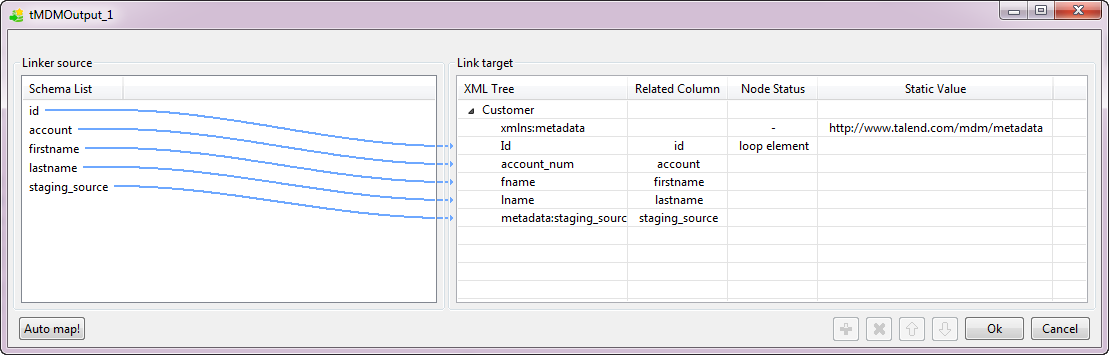
-
In the Link target area to the right, click in
the XML Tree field and then replace rootTag with the name of the business entity into which
you want to insert the data record, Customer in this
example. -
Add a namespace to write data into the metadata element source in this
example.- Right-click the Customer node, and select Add Name Space from the contextual menu.
-
In the [Namespace dialog] dialog box, enter
metadata in the Prefix field and
http://www.talend.com/mdm/metadata in the Namespace Value field.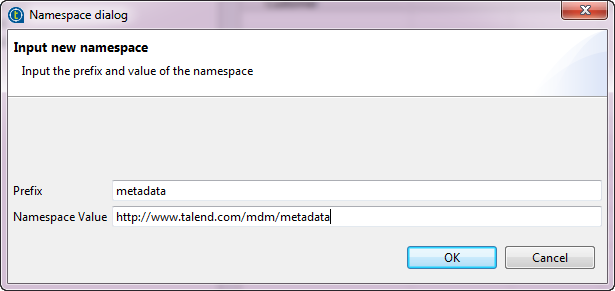
- Click OK to close the dialog box.
-
In the Linker source area, select the five schema
columns and drop them on the Customer node
respectively.The [Selection] dialog box is displayed. -
Select the Create as sub-element of target node option,
and click OK. -
In the XML Tree column, change the element names to the
corresponding elements you have defined in the Customer entity
or metata elements.Unlike elements defined in entities, metadata elements are built-in elements. To write
metadata elements for records into staging database, you need to follow the
format ofmetadata:staging_<source|status|error|blockkey>when
defining the path expression to select the XML node. -
Right-click the element in the Link Target area
you want to set as a loop element and select Set As Loop
Element from the contextual menu.In this example, Id is the iterating object. -
Click OK to validate your changes and close the
dialog box.
Document get from Talend https://help.talend.com
Thank you for watching.
Subscribe
Login
0 Comments