Configuring REST request parameters
-
Double-click the tRESTRequest component
to open its Basic settings view.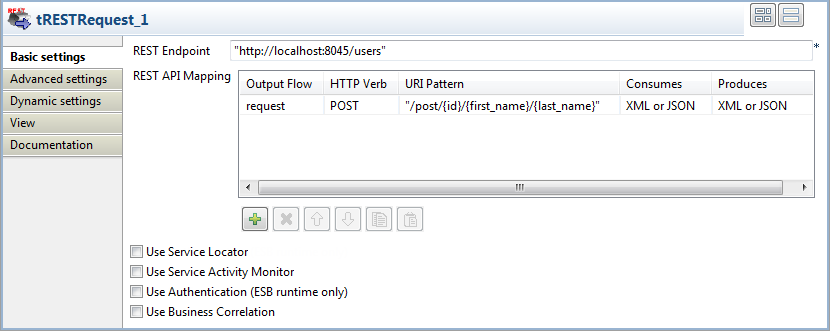
-
Fill the REST Endpoint field with the URI
location where the REST service will be accessible for requests, “http://localhost:8045/users” in this
example. -
Click the output flow name, which is request in this example, in the Output
Flow column of the REST API
Mapping table to show the […] button, and click the button to open the [Schema] dialog box. Then define the schema for
the request flow as follows:-
id, type Integer, 2 characters
long, set as the key column -
first_name, type String
-
last_name, type String
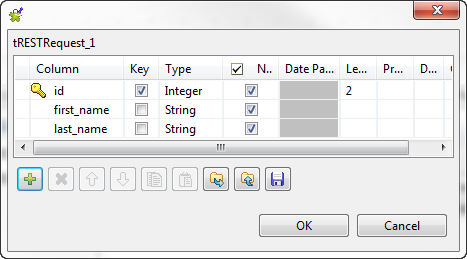 When done, click OK to validate the
schema setting and close the dialog box. -
-
Click the HTTP Verb column and select
POST from the list. -
In the URI Pattern column, enter the
acceptable URI pattern of POST requests,
"/post/{id}/{first_name}/{last_name}"in this
example.Leave the rest parameters as they are. -
Click the Advanced settings tab, and
select the Log messages check box.
Document get from Talend https://help.talend.com
Thank you for watching.
Subscribe
Login
0 Comments