Configuring the Job for catching messages triggered by the tWarn component
Configure the components used in the Job that catches the
messages triggered by the tWarn component and
then displays the messages on the console.
messages triggered by the tWarn component and
then displays the messages on the console.
-
Double-click the tRowGenerator
component to open its row generator editor.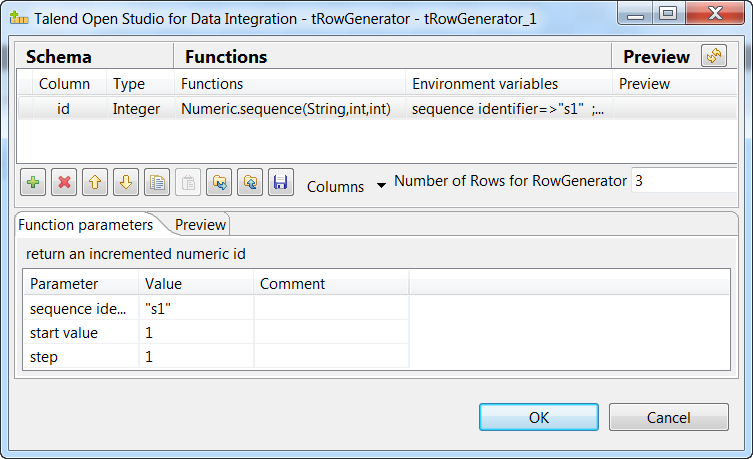
- Define the schema by adding one column id of Integer type, and select the predefined function Numeric.sequence(String,int,int) in the Functions column.
- Enter the number of records to be generated in the Number of Rows for RowGenerator field, 3 in this example. When done, click OK to close the dialog box.
-
Double-click the tWarn component to
open its Basic settings view.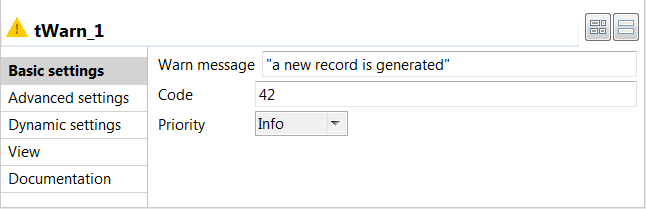
- Select Info from the Priority drop-down list.
-
In the Warn message field, enter the
message to be triggered when a new record is generated, a
new record is generated in this example. -
Double-click the tLogCatcher component
to open its Basic settings view.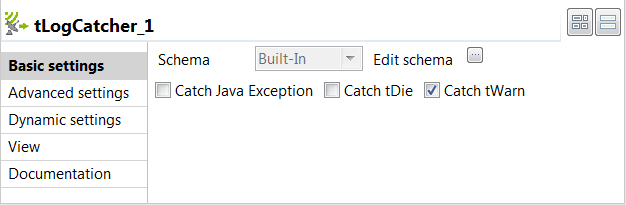
-
Select the Catch tWarn check box to
catch the messages triggered by the tWarn
component. -
Double-click the tLogRow component to
open its Basic settings view, and then select
Table (print values in cells of a table) in the
Mode area for better readability of the
result.
Document get from Talend https://help.talend.com
Thank you for watching.
Subscribe
Login
0 Comments