Configuring the Job for retrieving data from SAP BW via ODP
-
Double-click the tSAPODPInput component to open its
Basic settings view.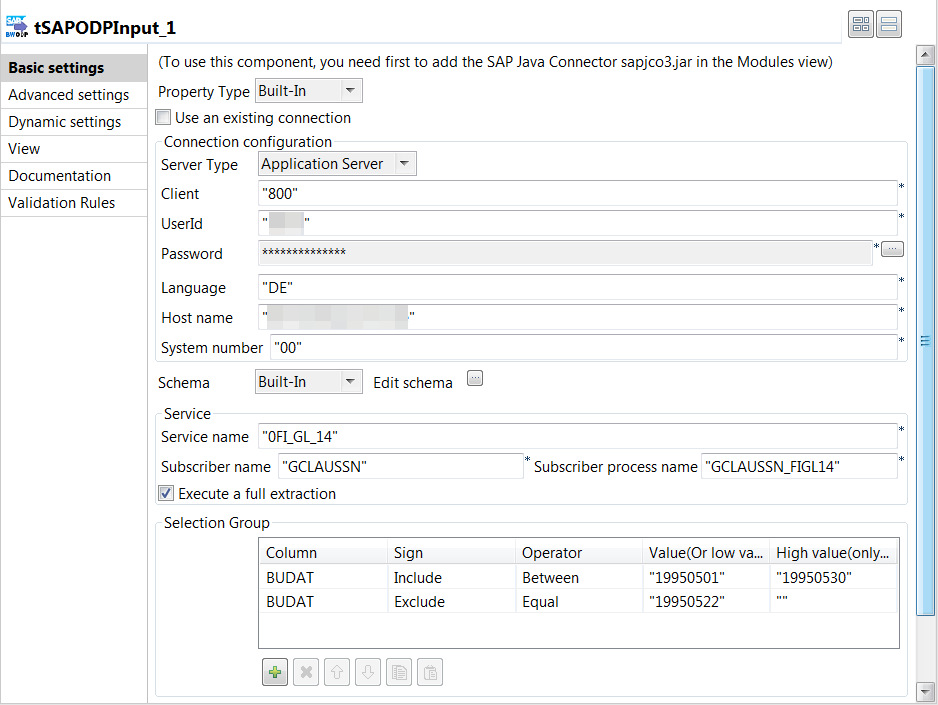
-
In the connection configuration related fields, specify the authentication
information required to access your SAP system. -
Click the […] button to open the schema dialog box and
define the schema by adding four columns, GJAHR,
DMSHB, and HWAER of String
type, and BUDAT of Date type with the date pattern
yyyy-MM-dd, whose data will be retrieved.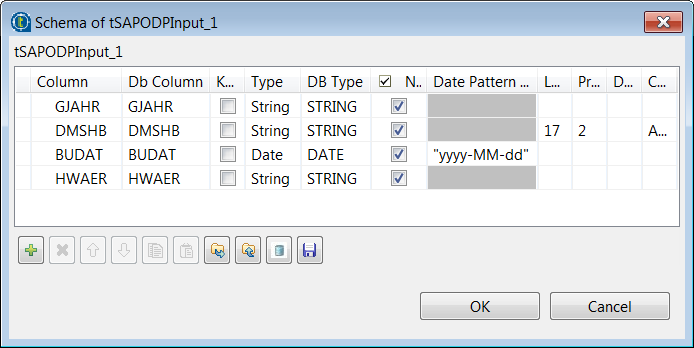
You can use the SAP metadata wizard to create a connection to your SAP
system, save the connection in the Repository, retrieve the Business Content
Extractor and its schema to be used, drag and drop the retrieved Business
Content Extract node onto the Job design workspace as a
tSAPODPInput component, and the connection
configuration and the schema will be automatically filled. For more
information, see the related description of centralizing SAP metadata. -
In the Service name field, enter the name of the
operational delta queue to be used, 0FI_GL_14 in this
example. -
In the Subscriber name and Subscriber process
name fields, enter the names of the subscriber and subscriber
process to be used, GCLAUSSN and
GCLAUSSN_FIGL14 in this example. -
Select the Execute a full extraction check box to
retrieve full data from the SAP system. -
Click the [+] button below the Selection
Group table to add as many filters as needed to filter data to
be retrieved and specify each filter.In this example, only the records whose BUDAT value is
set between 1995-05-01 and
1995-05-31 and is not equal to
1995-05-22 will be retrieved, so the following
two filters will be added.-
One filter is set on the column BUDAT, with
the sign Include, the operator
Between, the low value
19950501 and the high value
19950530, which will filter the records
whose BUDAT value is set between
1995-05-01 and
1995-05-31. -
Another filter is also set on the column
BUDAT, with the sign
Exclude, the operator
Equal, and the value
19950522, which will filter out the
records whose BUDAT value is equal to
1995-05-22.
To check which column can be used to define a filter, start transaction
RSA2 in SAP GUI and display all fields definition
for 0FI_GL_14, only the field whose
Selection Poss. check box is selected can be used
to define a filter.
-
-
Double-click the tFileOutputDelimited component to open
its Basic settings view. -
In the File Name field, specify the path to the file in
which retrieved data will be written,
D:/tsapodpinput_out.csv in this example.