Configuring the Jobs
-
On the second Job, select the tFileInputDelimited and on the Basic
Settings tab of the Component view, set the access parameters to the input
file.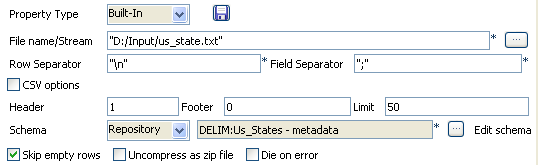
-
In File Name, browse to the file, and
fill the Row, Field
separators, and Header
fields according to the input file used. -
Describe the Schema of the data to be
passed on to the tSocketOutput
component.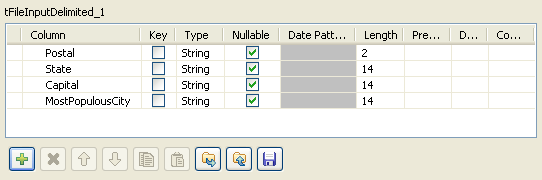 The schema should be propagated automatically to the output component.
 -
Select the tSocketOutput component and
set the parameters on the Basic Settings
tab of the Component view.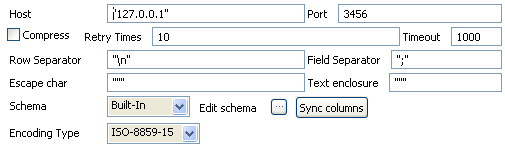
-
Define the Host IP address and the
Port number where the data will be
passed on to. -
Set the number of retries in the Retry
field and the amount of time (in seconds) after which the Job will time
out. -
Now on the other Job (SocketInput) design, define the
parameters of the tSocketInput
component.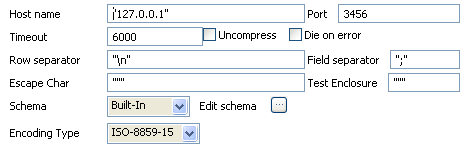
-
Define the Host IP address and the
listening Port number where the data are
passed on to. -
Set the amount of time (in seconds) after which the Job will time
out. -
Edit the schema and set it to reflect the whole or part of the other Job’s
schema.
Document get from Talend https://help.talend.com
Thank you for watching.
Subscribe
Login
0 Comments