Configuring the preprocessing process
-
Double-click tNormalize to display its Basic settings view and
define the component properties.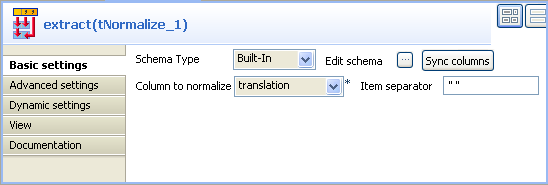
-
From the Column to
normalize list, select
translation.This will split the data strings in the
translation column into
words. -
In the Item separator
field, enter the separator which will delimits data
in the translation column, a
space character in this example. -
Double-click tFilterRow to display its Basic settings view and
define the component properties.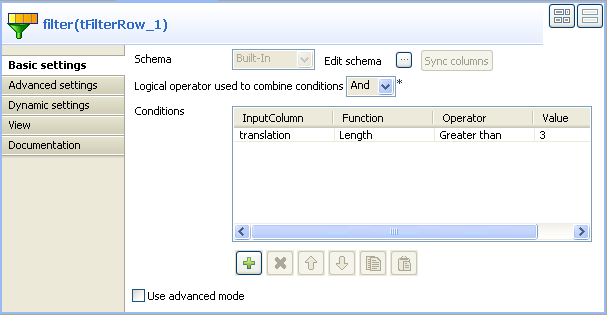
-
Select the logical operator you want to use in order
to combine simple filtering and advanced
mode. -
In the Conditions
area, click the plus button to add one or more
conditions to the output flow. And then in the
corresponding table column:-
select the input column you want to operate
on, -
select the needed function on the
list, -
select the operator to bind the input column
with the value, -
type in the value for content
filtering.In this example, we want to filter all
words in the translation
column that have less than three letters.
-
Document get from Talend https://help.talend.com
Thank you for watching.
Subscribe
Login
0 Comments